Stop Wasting Your School's Budget on Idle PCs.
Auto Shutdown Manager gives you granular control to power down student labs, teacher workstations, and admin PCs—without interrupting late-working staff or critical updates.
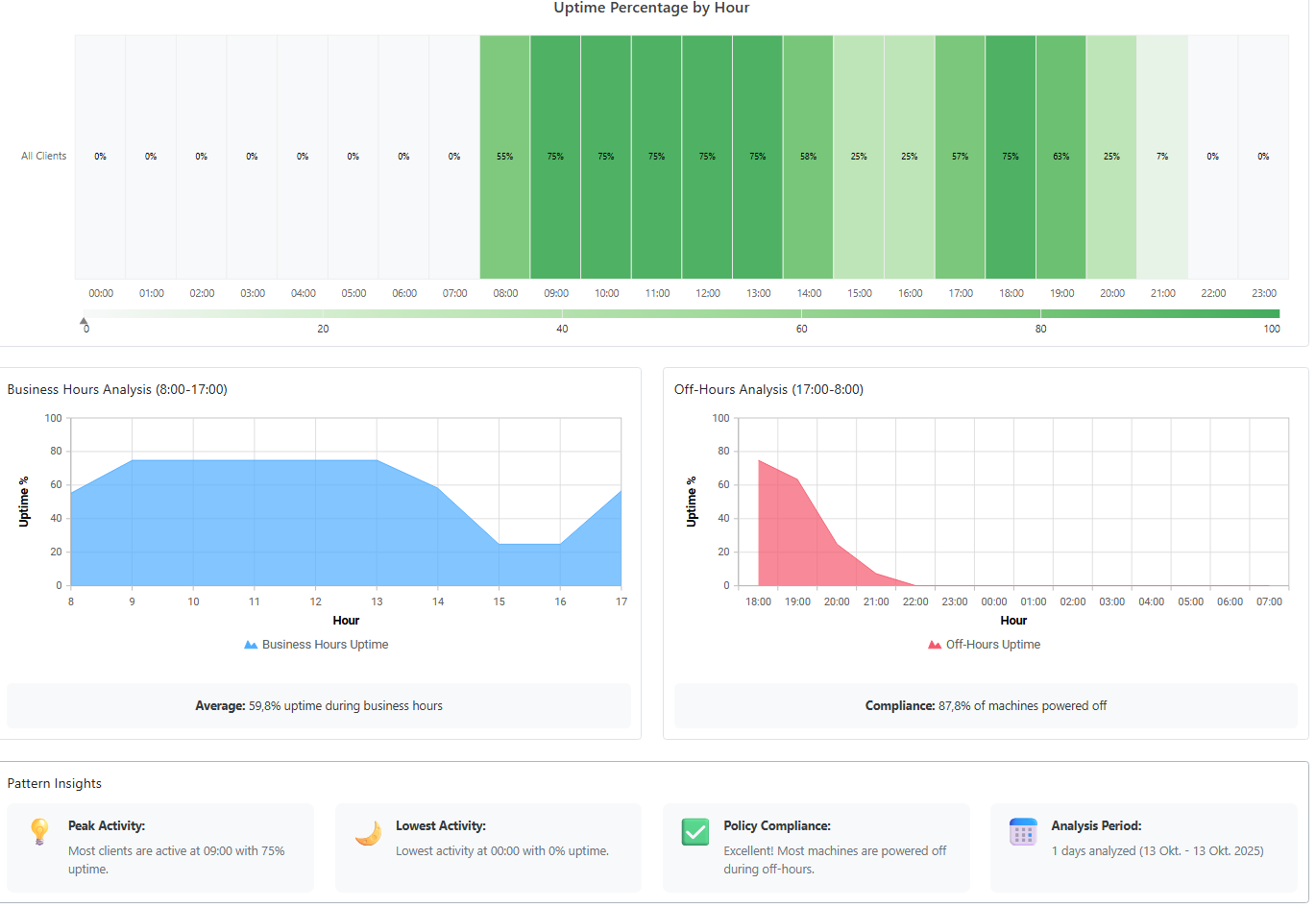
Auto Shutdown Manager gives you granular control to power down student labs, teacher workstations, and admin PCs—without interrupting late-working staff or critical updates.
















Unpatched PCs are your biggest risk. When machines are off during maintenance, updates fail, leaving you exposed. We ensure every PC is online for patching, every time.

Hundreds of PCs left on overnight drain your budget. We shut them down automatically and generate reports that prove the savings to your business manager.

A fixed 5 PM shutdown doesn't work for staff. Our intelligent rules keep PCs on only when they're in use, preventing interruptions and helpdesk tickets.
Create separate, customized power-down schedules for every computer lab, library, and staff office. Set aggressive policies for student PCs and flexible ones for teachers, all from a central console.
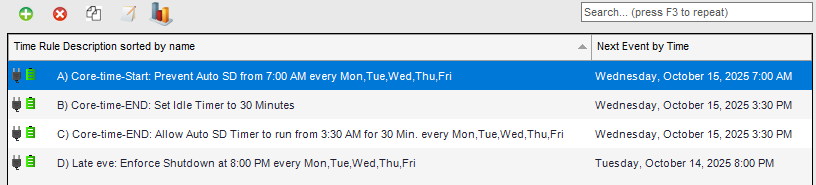
It's not just a timer. Auto Shutdown Manager checks for active users, running processes, and network load, preventing shutdowns during a late-night project. Users can even be allowed to delay when needed.

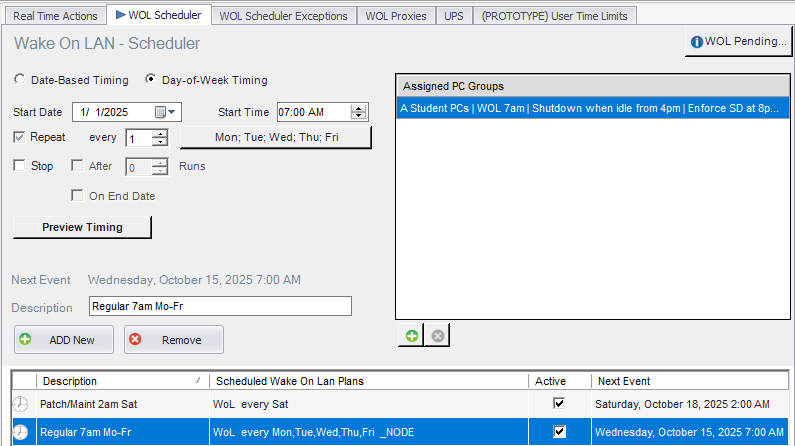
From one console, wake hundreds of machines for updates, run maintenance scripts, and then ensure they all shut down again. Our WoL works reliably across subnets and VLANs, where others fail.
You're a skilled sysadmin. You absolutely could build a version of this with PowerShell, GPOs, and the Task Scheduler. We know, because we've been there. But the real question isn't "can you," it's "should you?" Consider the true cost of a "free" solution.
 Time Sink:Hours of writing, testing, and debugging scripts that you have to maintain forever.Rigid & Inflexible:A teacher needs to stay late? Their PC shuts down anyway, creating a helpdesk ticket.Data Loss Risk:A simple script forces a shutdown, causing teachers to lose unsaved work and corrupting files.Unreliable WoL:Your script works on 90% of machines, but fails across VLANs and different hardware, making your maintenance window a gamble.Management Nightmare:Making a change means editing a GPO, waiting for replication, and hoping it applies everywhere.Zero Visibility:You can't easily prove the savings to your business manager. There are no reports.The "Bus Factor":If you get a new job, will your replacement understand your complex scripts?
 Setup in Minutes:Be up and running with a GUI and central dashboard in less than half an hour.Intelligent & Flexible:Automatically detects active users and running processes. Staff can be allowed to delay shutdowns. No more angry calls.No Data Loss:Automatically saves open documents before shutdown.Rock-Solid WoL:Enterprise-grade Wake on LAN designed to work reliably across subnets and diverse network environments.Central Dashboard:Manage everything, for thousands of PCs, from one simple console.Built-in Reporting:Generate clear reports that show energy and cost savings.Supported & Documented:If something doesn’t work, you call us. The next admin can manage it instantly.
Your time is your district's most expensive resource. For a one-time cost that is less than a few hours of your salary, you get a robust, supported, and powerful tool. Auto Shutdown Manager isn't a replacement for your skills; it's a force multiplier for your time.
"Auto Shutdown Manager is very flexible. I’m very impressed. Easy to use, easy to deploy… you can’t ask for more than that."
Read the Full Case Study (PDF) Deployed district-wide on ~1,200 PCs Automatic logoff after each class bell Labs shut down at 5:30 pm, building at 10:00 pm Seamless client updates
"I’ve never known a company in this industry to be so accommodating to their customers."
Read the Full Case Study (PDF) District-wide rollout to 8,500 PCs Integrated with Microsoft SCCM Scheduled power-off and wake for updates Supports holiday shutdownsGet all features, including Wake on LAN, for your entire school building. We believe powerful tools should be accessible on a school budget.
Install the central Auto Shutdown Manager Server on one machine (physical or virtual). Then deploy a small, silent client agent to all managed PCs—typically via Group Policy (GPO) in Active Directory.
Yes. It integrates seamlessly with Active Directory. You can assign PC power management settings based on OUs, AD groups, and computer names to leverage your existing structure.
Most K–12 customers have the server up and their first batch of clients running in under 30 minutes. Start simple and go advanced when you’re ready—our team supports you either way.
The client agent is a lightweight MSI package (~23 MB) compatible with Windows 7–11 and requires the .NET Framework 4.x. The server runs on Windows Server 2012 R2–2025 and also requires the .NET Framework 4.x. A database is optional but recommended; Auto Shutdown Manager supports Microsoft SQL Express 2012+ and newer. Deployment—from client provisioning to policy assignment—can be fully automated, enabling seamless rollouts to thousands of clients.
We support two enterprise-grade methods: (1) Directed Broadcasts if your network hardware and firewall policies allow it, or (2) subnet-local WOL Proxies (for example, a client PC or Raspberry Pi acting as a listener) that require no special firewall rules—our most common approach in complex networks.
In this configuration, one client per subnet remains powered on (24/7) to handle Wake-on-LAN requests from the server. The server automatically selects the “cheapest” available client for this role based on current activity and power state, ensuring efficient and reliable wake-up operations across all subnets.
The agent gracefully saves common Microsoft Office documents (Word, Excel, PowerPoint, Project, Visio) before shutdown. Outlook items are saved as drafts.
If the original document location—such as a network drive—is temporarily unavailable, files are automatically saved to the local PC as a fallback to prevent data loss.
For other applications or custom workflows, you can run pre-shutdown scripts to handle specific save routines.
The one-time $499 fee covers a perpetual license for one school building with unlimited clients in that building, plus one year of maintenance (software updates and technical support). After the first year, maintenance is $99/year. If you choose not to renew, your perpetual license continues to work; you’ll still get free updates and basic email support. Major version upgrades, new features, and priority support require active maintenance. If maintenance lapses, it can’t be renewed, but you can purchase major upgrades at a discount.
The $499 license covers a single school building. For multi-campus organizations (districts, universities), we offer custom site licenses and significant volume discounts. Contact us for a district-wide quote.
The product has been hardened since 2009 across hundreds of thousands of clients. We provide free, hands-on support and consulting during evaluation, pilot, and rollout. With an active maintenance contract, this premium support continues for the entire product lifecycle at no additional cost.
It takes less than 30 minutes to set up. See the results for yourself.
Start Your Free 45-Day Trial Now