 DE
DE  EN
EN 
Solutions · Remote PC Power Control
Remote PC Power Control for Enterprise IT
Wake, restart and shut down PCs across offices, branches and remote sites from the ASDM Management Console. Support staff can run power actions without asking someone on site to turn a PC on or off.
PC availability
Remote tools cannot help when the PC is not reachable
Helpdesk, RDP, VPN, inventory and deployment tools all depend on one simple condition: the endpoint must be powered, reachable and in the expected state. In real operations, the needed PC may be off, asleep, in another building, behind a routed network, at a branch site or simply unavailable when IT needs it.
No local hands
Admins should not have to call someone on-site just to press a power button, restart a PC or confirm that a device is online.
Distributed locations
Enterprise PCs may sit in offices, departments, classrooms, labs, branches or remote sites across different network segments and time zones.
Support and maintenance
Remote support, patching, scans, inventory and scripted actions need endpoints to be available at the right time, not running all day and night.
Urgent response
IT can shut down or restart selected PCs remotely for support, maintenance or incident response, without waiting for someone on site.
How it works
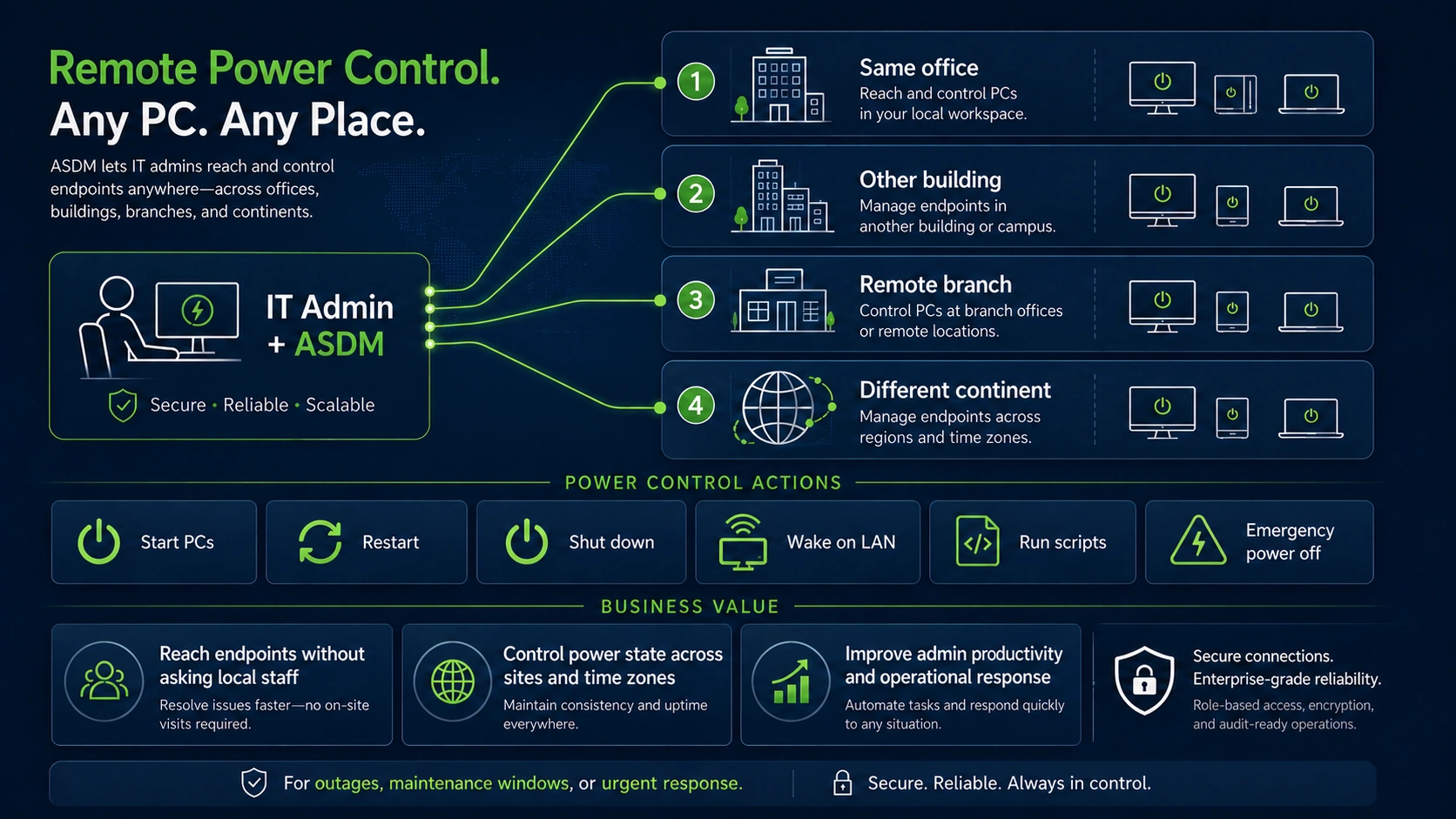
Control power state across rooms, sites and time zones
This diagram shows the steps, not the ASDM interface: select the PCs or groups, choose the power action, and check their status afterwards.
Why standard tools are not enough
Central power control for IT operations
ASDM does not replace remote-access, deployment or endpoint-management platforms. It complements them by solving the power-state and runtime-control problem around those tools.
Reach a PC without local staff
IT needs the endpoint available even when nobody is near the device.
Remote tools need a running PC
RDP, VPN, remote-support tools and inventory systems cannot manage a PC that is powered off, asleep or unreachable.
Central wake and power-state control
ASDM lets IT wake selected PCs or groups and then apply configured restart, shutdown, standby, hibernate or logoff actions where policy and device conditions allow.
Work across buildings and sites
Power control must work beyond the same room or same switch.
Wake-on-LAN is fragile in real networks
Basic magic packets often fail across VLANs, routed networks, branch sites or remote segments unless the network path is designed for wake traffic.
Enterprise wake patterns
ASDM supports enterprise wake scenarios such as Wake-on-LAN, Wake-on-WAN and WOL Proxy approaches where hardware, network routing and configuration support them.
Restart or shut down after work
After support, patching or diagnostics, PCs should return to the intended power policy.
Always-on becomes the fallback
When wake and shutdown are unreliable, organizations often leave PCs running to avoid availability problems, wasting energy and extending unnecessary runtime.
Return devices to policy
ASDM can return devices to configured shutdown, standby, hibernate or runtime policies after maintenance or support work, depending on rules, workload and endpoint conditions.
React in urgent operational situations
Sometimes IT needs to take selected endpoints offline quickly and centrally.
Local action is too slow
Calling a colleague, waiting for physical access or relying on ad-hoc scripts creates delay and inconsistent handling.
Controlled central power action
Power management is not a security product. But central power control can help IT move selected devices into a controlled offline or shutdown state faster when an operational or security-related situation requires it.
Standardize actions across teams
Helpdesk and operations should not depend on one-off scripts or personal workarounds.
Script sprawl is hard to govern
Manual scripts and local procedures may solve individual cases, but they are difficult to audit, repeat and scale across departments or locations.
Policy-based operations
ASDM centralizes power actions, schedules, groups and reporting so IT can apply consistent controls instead of relying on local improvisation.
Admin workflow
Wake or restart unreachable endpoints under central control
Wake, restart or shut down PCs and groups centrally, using shared rules and schedules.
Select target
Choose a PC, group, department, site or maintenance target instead of treating all endpoints the same way.
Apply action
Wake, restart, shut down, log off, standby, hibernate or run configured actions according to policy.
Use existing tools
Once the PC is reachable, your remote support, deployment, inventory, antivirus or maintenance tools can do their job.
Return to policy
After work is complete, the endpoint can return to the intended power state and the result can be logged or reported.
Console
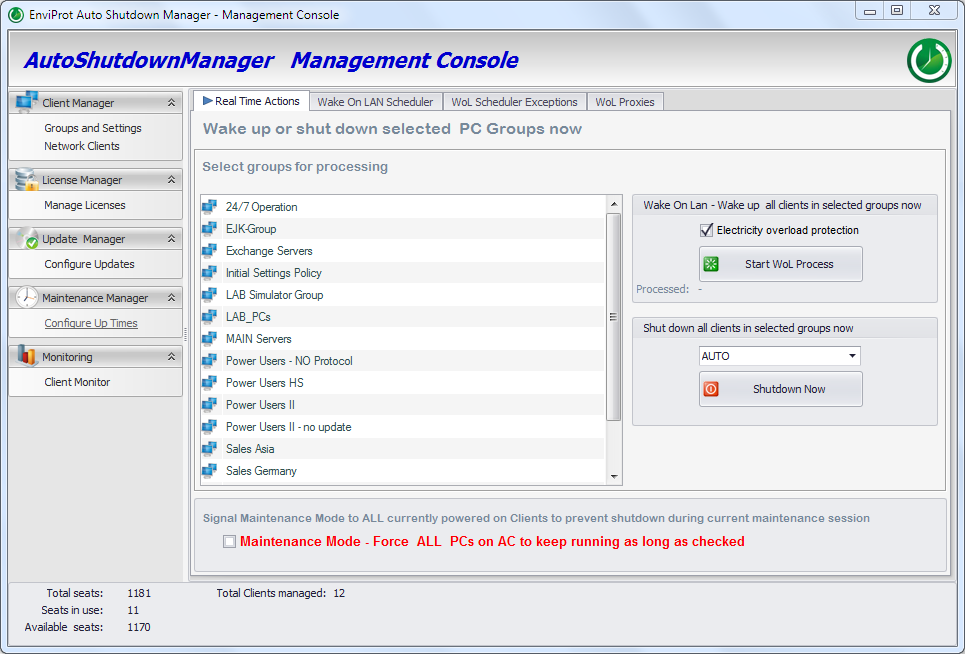
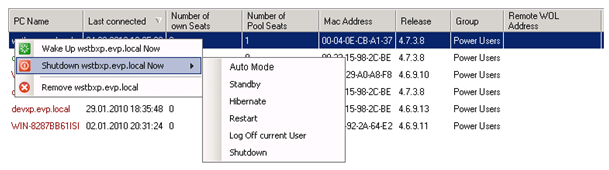
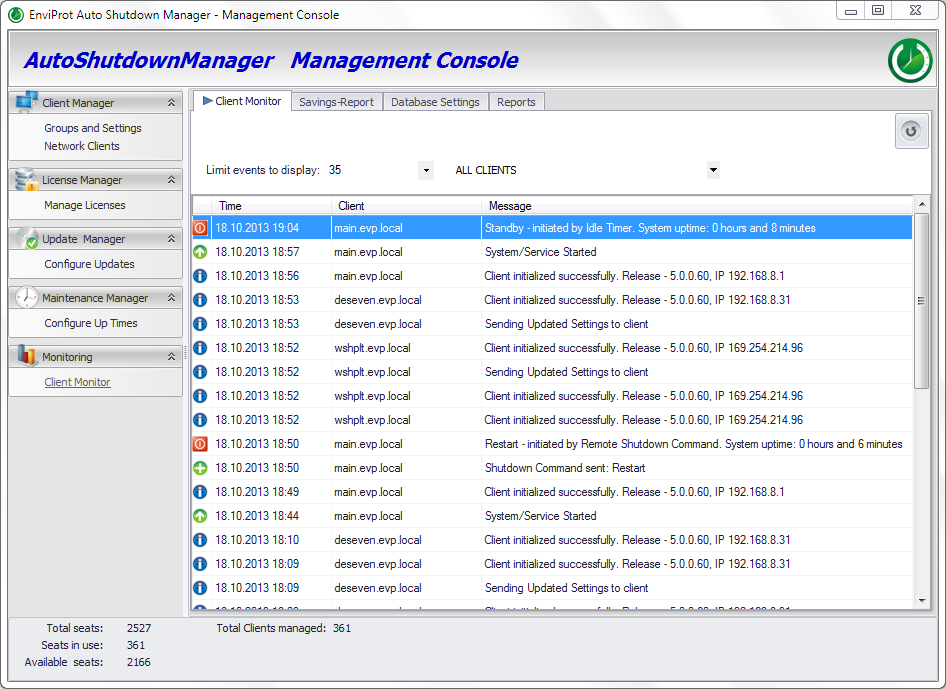
Remote power actions in the Management Console
ASDM exposes the practical pieces IT needs: real-time actions, Wake-on-LAN support, group management, scheduling and reporting. Validate the exact behavior in your own hardware and network environment. For the central shutdown and restart capabilities, see remote shutdown software for managed PCs.

Controlled runtime, not security replacement
Useful in urgent response — but not a substitute for endpoint security
ASDM does not replace EDR, antivirus, patching, hardening or incident-response tools. It can support IT operations by reducing unnecessary runtime and by helping teams move selected endpoints into a controlled power state when an operational or security-related situation requires it.
Where it helps
Typical IT operations scenarios
Remote PC Power Control is strongest when IT needs speed, consistency and fewer manual interruptions across many endpoints.
Helpdesk escalation
A support engineer needs to wake or restart a user PC in another office before using the existing remote-support tool.
Branch maintenance
IT prepares endpoints in a remote location for updates, scans or inventory without asking local employees to handle power state manually.
After-hours actions
Devices can be made available for planned work and returned to the configured power policy afterwards.
Lab, classroom or shared PCs
Groups of non-personal endpoints can be started, restarted or shut down according to operational need and policy.
Distributed organizations
Use the same console to manage power actions across sites, departments and time zones.
Urgent offline action
When a device should no longer remain powered, IT can initiate a controlled power action without waiting for someone near the device.
FAQ
Questions IT teams usually ask
Does ASDM replace VPN, RDP or remote-support tools?
No. Those tools connect to a reachable machine. ASDM handles the power control around them: waking, restarting, shutting down and returning endpoints to policy.
Does ASDM replace SCCM, MECM, Intune or GPO?
No. ASDM complements Microsoft endpoint management by helping ensure PCs are available when needed and not left running unnecessarily afterwards.
Can IT control PCs in another building or site?
Yes, where the network, hardware and ASDM configuration support the required wake or power-control scenario. Enterprise networks should validate Wake-on-LAN, Wake-on-WAN and WOL Proxy behavior in their own environment.
Can ASDM shut down PCs after support or maintenance?
ASDM can apply configured shutdown, standby, hibernate, logoff or restart actions according to policy and current endpoint conditions. The exact action should match your operational rules.
Is emergency power-off a security feature?
It is an operational power-control capability, not a replacement for security tooling. In security-related situations it may help IT move selected devices offline faster, while endpoint protection, investigation and remediation remain separate responsibilities.
Shut down safely. Wake reliably. Prove the savings.
Give IT central control over endpoint runtime
Start with a controlled pilot: wake selected PCs, validate network behavior, test remote actions and measure the effect before scaling across sites.