 DE
DE  EN
EN 
Platform · Modern Standby / S0 Handling
Modern Standby Driver and S0 Power-State Control
On Modern Standby (S0) PCs, ASDM can apply hibernation rules, support scheduled wake-up and control compatible external monitors through DDC/CI.
Why Modern Standby is different
S0 can look like sleep while the device still consumes power.
With Modern Standby, many Windows 10/11 laptops and compact PCs no longer use classic S3 sleep in the way IT teams expect. A device may appear idle or asleep while parts of the system remain active. In real operations, this can mean battery drain, heat in a closed laptop bag, missed scheduled maintenance or external monitors left running during unattended runtime.
Battery drain
S0 devices can continue consuming power after the screen turns off, especially on mobile devices running on battery.
Heat risk
If a laptop remains active in a closed bag, heat and battery drain become an operational support issue.
Unreliable wake
Scheduled wake events may not behave like classic wake timers on every Modern Standby system.
External displays
External monitors can become part of the power-management problem when PCs run unattended.
ASDM approach
Hibernation, wake-up and monitor control
Use ASDM power policies, the optional S0 Wake Driver and DDC/CI monitor control to manage compatible Modern Standby PCs and displays.
Intelligent hibernation logic
For S0-capable systems, ASDM can use configured timers and policies to move from Modern Standby into hibernation where appropriate, helping reduce battery drain and heat risk.
EnviProt S0 Wake Driver
The optional add-on helps scheduled wake events created by ASDM run more reliably on many Modern Standby systems where classic wake behavior is limited.
Monitor DDC/CI management
For S0-based PCs with supported external monitors, ASDM can use DDC/CI to turn external monitors off and on, and optionally lock the PC for improved energy savings and security.
Power states
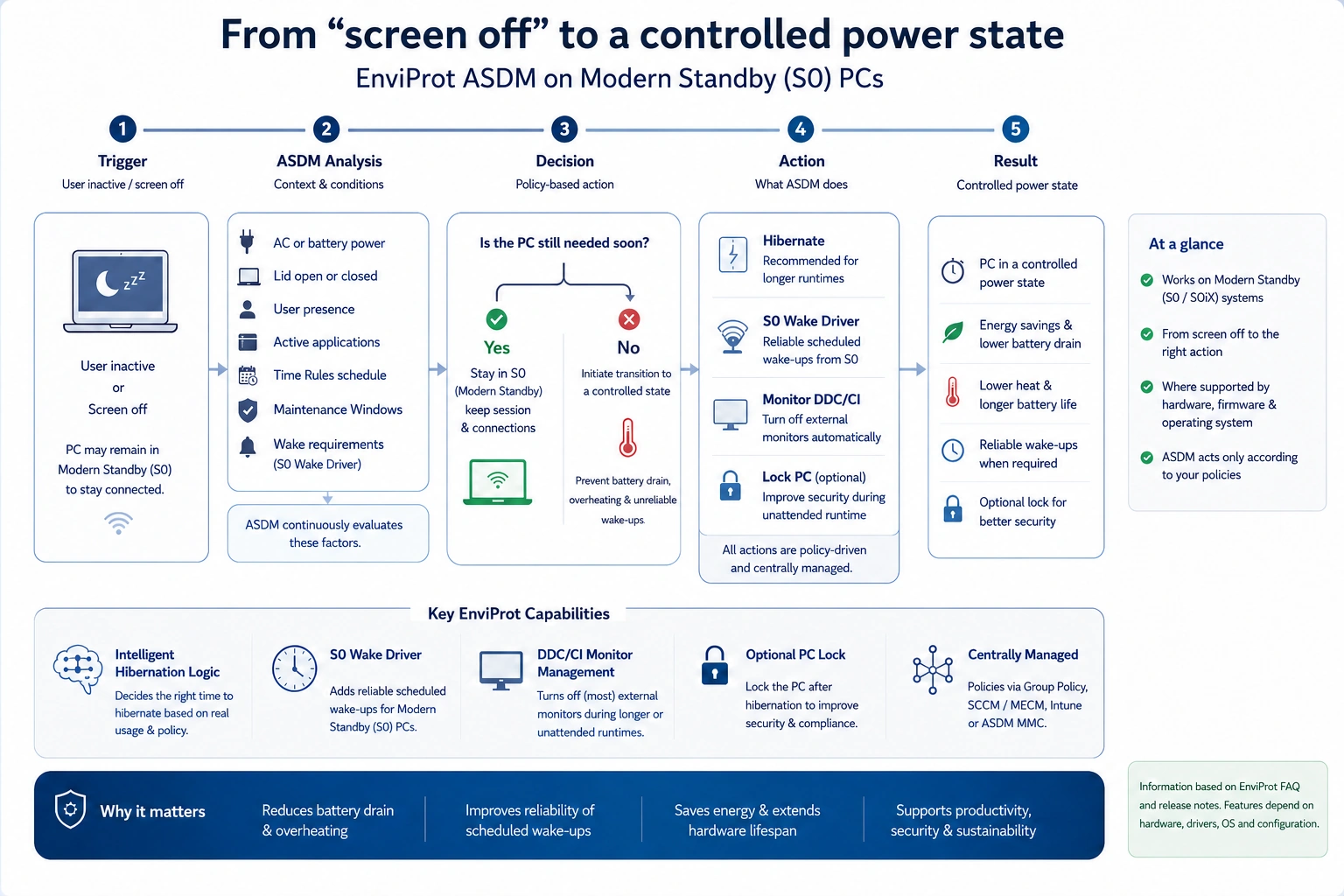
Control power states on Modern Standby devices
A Modern Standby PC can still use power with its screen off. ASDM checks your rules, user activity, running tasks and scheduled wake times before changing its power state.
Testing
Modern Standby behavior depends on hardware, firmware, drivers and policy.
ASDM can help control S0 runtime, hibernation, scheduled wake and external monitor handling where the Windows device, monitor and driver environment support the required actions. Validate the behavior on the target hardware before broad rollout.
S0 Wake Driver
Scheduled wake events need help on many Modern Standby systems.
Classic wake timers do not behave consistently across every S0-based device. The EnviProt S0 Wake Driver is an add-on for Auto Shutdown Manager environments where scheduled wake from Modern Standby or hibernation needs to be made more dependable.
Downloadable add-on
The optional EnviProt S0 Wake Driver supports scheduled wake events on suitable Modern Standby/S0 devices. Availability and the current package are listed centrally in the downloads area.
Works with ASDM Time Rules
After installation, administrators can configure ASDM Time Rules and wake planning as usual, then validate the behavior on their target hardware.
Important condition
Modern Standby behaviour depends on hardware, firmware, drivers and Windows power policy.
The S0 Wake Driver can help with scheduled wake reliability, but every device model should be tested. BIOS/UEFI settings, Windows power policy, device firmware and driver behaviour can all affect the final result.
Newer capability: external monitors
Monitor DDC/CI management adds another missing piece for S0-based desks.
Recent ASDM releases add monitor DDC/CI management for S0-based PCs and Modern Standby PCs with external monitors. Where the monitor and graphics path support DDC/CI, ASDM can turn most external monitors off automatically during longer or unattended runtime, turn them on again, and optionally lock the PC.
Turn monitors off
Reduce external-display runtime during unattended periods where DDC/CI is available and supported.
Turn monitors on again
Bring supported external displays back when the endpoint needs to be available again.
Optional PC lock
For unattended runtime, the PC can optionally be locked to support energy savings and security-oriented operating routines.
Terminology note: The correct standard name is DDC/CI — Display Data Channel Command Interface. The feature depends on monitor, graphics adapter, cable and driver support.
Why standard power settings are not enough
Modern Standby needs operational control, not just a sleep timeout.
Windows power settings are still relevant, but they do not cover the full enterprise process: user work, time rules, hibernation fallback, wake reliability, external monitors and proof of runtime reduction.
FAQ
Questions IT teams ask about Modern Standby and S0
What is Modern Standby / S0?
Modern Standby, also called S0 low-power idle, is a Windows power model where the system can appear asleep while parts of the device remain active. This differs from classic S3 sleep and can create new operational challenges for IT.
Why can Modern Standby cause battery drain or overheating?
If the device does not fully power down, it can continue consuming power. On mobile devices, this can drain the battery or create heat when a laptop is closed and stored in a bag.
What does the EnviProt S0 Wake Driver do?
It is an add-on for ASDM environments where scheduled wake events need to work more reliably on Modern Standby systems. Behaviour still depends on the device model, firmware, drivers and Windows power policy.
Does the S0 Wake Driver work on every Modern Standby device?
Not universally. Modern Standby behaviour is highly dependent on hardware and firmware. The S0 Wake Driver can help, but each device model should be validated before broad rollout.
What is monitor DDC/CI management?
DDC/CI means Display Data Channel Command Interface. Where the monitor, graphics adapter, cable and drivers support it, ASDM can turn external monitors off and on during longer or unattended runtime.
Can ASDM lock the PC when managing external monitors?
Yes, recent ASDM releases describe an optional PC lock when using DDC/CI monitor management for S0-based PCs with external monitors.
CONTROL S0 INSTEAD OF HOPING IT BEHAVES
Test Modern Standby handling before it becomes a fleet-wide support problem.
Start with a representative pilot group of S0 devices, external monitors and common laptop models. Validate hibernation timing, scheduled wake behaviour, monitor DDC/CI support and user impact before rolling out broadly.