 DE
DE  EN
EN 
Solutions · Enterprise IT
Endpoint power management for complex enterprise networks
Manage PC shutdown, Wake-on-LAN and reporting across sites from one console. ASDM keeps PCs available for users, remote access and maintenance according to your policies.
The enterprise problem
Save energy without disrupting users, remote access or maintenance
Keep using Windows, Group Policy, Configuration Manager and Intune. Add ASDM to manage when PCs shut down, when they wake up and how savings are reported.
Machines stay on “just in case”
PCs are often left running because IT cannot risk missing maintenance, remote access or support availability. That protects availability, but it also wastes runtime.
Wake-up becomes unreliable at scale
Use WOL Proxies to wake PCs across VLANs and sites without relying on broadcast forwarding through routers.
Scripts need maintenance
One-off shutdown and wake scripts can work for a while, then become hard to maintain, document, hand over and prove to management.
At a glance
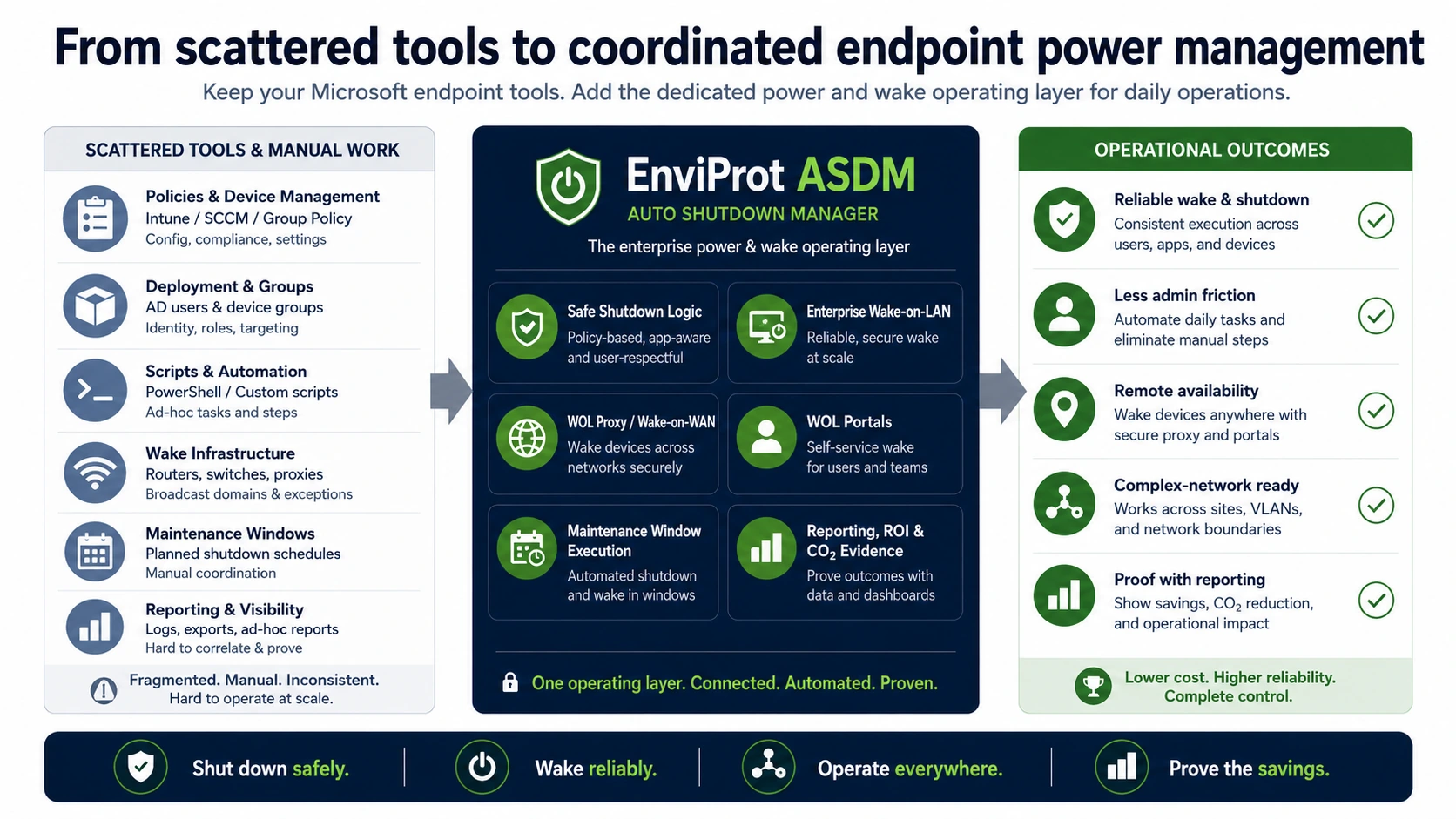
Keep Microsoft endpoint tools. Add centralized power and wake control.
Use ASDM alongside your endpoint management tools to protect active users, wake PCs for maintenance and remote access, and report savings.
Integration
Add ASDM to your existing endpoint tools
ASDM handles shutdown rules, wake-up and savings reports while your Microsoft tools continue to manage deployments, updates and endpoint configuration.
Existing stack
Policy, configuration and deployment
Windows settings, GPO, SCCM/MCM, Intune and scripts remain useful for configuration, compliance, deployment and administration.
With ASDM
Runtime decisions across real users and networks
IT still has to decide when shutdown is safe, when wake-up is required, how remote sites are reached and how savings are proven.
ASDM
Shut down safely. Wake reliably. Prove the savings.
ASDM brings shutdown, wake, portals, maintenance windows and reporting into one ready-made enterprise power-management workflow.
ASDM answer
What ASDM adds to enterprise operations
The value is not one magic button. It is the operational connection between safe shutdown, reliable wake-up, user protection, maintenance and proof.
User-aware safe shutdown
ASDM helps avoid disruptive shutdowns by considering user activity, configured schedules and operational conditions before power policies take effect.
Explore idle shutdownEnterprise Wake-on-LAN
Central wake requests can be delivered across routed environments using the appropriate wake path for the network design.
Explore Enterprise Wake-on-LANWOL Proxy and Wake-on-WAN
For remote segments and sites, ASDM supports managed wake delivery patterns instead of relying on ad-hoc router exceptions alone.
Explore WOL ProxyWOL Portals for remote users
Authorized users and helpdesk workflows can wake assigned office PCs without leaving machines powered on permanently.
Explore WOL PortalsMaintenance-window readiness
ASDM can help keep endpoints available for patching, scans and support work, then return them to power-saving policy afterwards.
Explore maintenance windowsReporting, ROI and CO₂ proof
Enterprise power management needs proof. ASDM reporting helps estimate, validate and communicate runtime, cost and CO₂ impact.
Calculate ROIOperational exposure reduction
ASDM does not harden endpoints or replace security tools. It can support exposure reduction by helping avoid unnecessary endpoint runtime when devices are not needed.
See Microsoft complement positioningMicrosoft fit
Designed to complement SCCM/MCM, Intune and Group Policy
Enterprise IT does not need another tool that pretends the rest of the stack does not exist. ASDM fits beside Microsoft endpoint management and closes the dedicated power-and-wake process around it.
SCCM / Microsoft Configuration Manager
Configuration Manager can support deployment and maintenance scenarios. ASDM adds the daily power-state workflow around shutdown reduction, wake availability and maintenance readiness.
Explore SCCM/MCM integrationIntune and Group Policy
Intune and GPO are useful for configuration and policy. ASDM adds runtime decisions, user protection, wake routing and savings proof for daily endpoint operations.
Compare native tools and ASDMEnterprise value
One workflow for admins, IT leaders and management proof
For IT admins
Reduce repeated troubleshooting around sleep states, wake paths, late users, maintenance availability and script exceptions.
For IT leaders
Move from scattered policies and scripts to a repeatable operating model that can be piloted, documented and scaled.
For CxO and procurement
Support cost, energy and CO₂ goals with a measurable enterprise tool instead of a long custom project.
Reduce avoidable runtime exposure
Power management is not a security product. But unnecessary runtime can mean unnecessary exposure. ASDM can help reduce avoidable endpoint runtime while preserving wake-up and maintenance availability.
Rollout path
Start small. Validate in your environment. Scale safely.
Endpoint power management depends on real users, real network paths and real maintenance routines. A pilot should prove savings and availability before broad rollout.
1. Pilot a representative group
Select departments, device types and remote segments that reflect your actual operating model.
2. Validate wake and shutdown rules
Check user protection, maintenance availability, Wake-on-LAN paths and exception handling before expanding scope.
3. Prove and scale
Use reporting and ROI estimates to communicate results, then expand policies and wake workflows across more groups.
FAQ
Questions enterprise IT teams ask first
Does ASDM replace SCCM/MCM, Intune or Group Policy?
No. ASDM complements Microsoft endpoint management. SCCM/MCM, Intune and GPO remain useful for configuration, deployment and policy. ASDM adds the dedicated endpoint power and wake workflow around those tools.
Will users be interrupted by shutdown policies?
The goal is controlled, user-aware shutdown, not forced interruption. Policies should be configured and validated in your environment so active users, approved exceptions and maintenance tasks are respected.
Can ASDM wake PCs across VLANs, routed networks and remote sites?
ASDM supports enterprise wake scenarios including WOL Proxy and Wake-on-WAN patterns. Wake success still depends on endpoint hardware, firmware, power state and the available network path.
How does ASDM help with remote work?
WOL Portals can let authorized users wake assigned office PCs when needed, while IT keeps the wake workflow controlled instead of leaving PCs running all the time.
Can ASDM support maintenance windows?
Yes. ASDM can help align endpoint availability with patching, scans and administrative routines, then return devices to power-saving policy after the work is complete.
Is ASDM a security product?
No. ASDM is not an endpoint security product and does not replace endpoint protection, patching or hardening. It can help reduce unnecessary endpoint runtime while preserving wake-up and maintenance availability.
How should an enterprise start?
Start with the 45-day Enterprise Trial, choose a representative pilot group, validate wake reliability and user protection, then use reporting and ROI estimates to decide how to scale.
Can shutdown policies reduce operational exposure?
They can support it, but only as a secondary operational benefit. Power management is not endpoint security. However, if a PC does not need to run overnight or over a weekend, reducing that unnecessary runtime can also reduce unnecessary exposure while patching, endpoint protection and hardening remain separate responsibilities.
Enterprise trial
Turn endpoint power control into a managed enterprise workflow
Use the 45-day Enterprise Trial to validate safe shutdown, reliable wake, maintenance availability and reporting in your own environment.