 DE
DE  EN
EN 
Platform · MECM / SCCM Integration
MECM (SCCM) Integration for Endpoint Power Management
Microsoft Configuration Manager handles deployments and updates. ASDM wakes PCs for the maintenance window and applies your shutdown or standby rules afterwards.
Maintenance
Deployments fail when the endpoint is powered off — and waste energy when everything stays on.
Use ASDM to wake PCs before MECM/SCCM jobs and apply your shutdown rules afterwards, with exceptions for active users and running tasks.
Sleeping endpoints
A deployment window is only useful if the target PCs are actually reachable when the job starts.
Always-on workaround
Keeping PCs powered on just to be safe increases avoidable runtime, costs and operational exposure.
Script sprawl
Wake, shutdown and restart scripts can become fragile when they are not part of a managed power process.
User disruption risk
Maintenance actions should avoid interrupting active users, open work or still-running business jobs.
How the integration fits
Configuration Manager handles the deployment. ASDM handles endpoint availability around it.
The ASDM MECM (SCCM) integration is about timing and control: synchronize wake planning with deployment schedules, support on-demand wake and shutdown from the Microsoft Configuration Manager console, and keep the endpoint power state aligned with real IT operations.
MECM deployment
Software updates, deployments or maintenance work are planned in Microsoft Configuration Manager.
ASDM wake timing
ASDM can synchronize wake planning with MECM deployment timing for the affected PCs.
Endpoint availability
Wake-on-LAN, WOL Proxies and ASDM policies help make endpoints available for the work.
After maintenance
After the work is complete, endpoints can return to a configured shutdown, standby or runtime policy.
Process overview
Wake PCs in time for Configuration Manager deployments
Admins keep using MECM / SCCM for deployment timing and Device Collections. ASDM synchronizes the relevant schedule, creates a wake plan, uses the configured WOL infrastructure and helps target PCs be awake before updates, maintenance or software rollout begin.
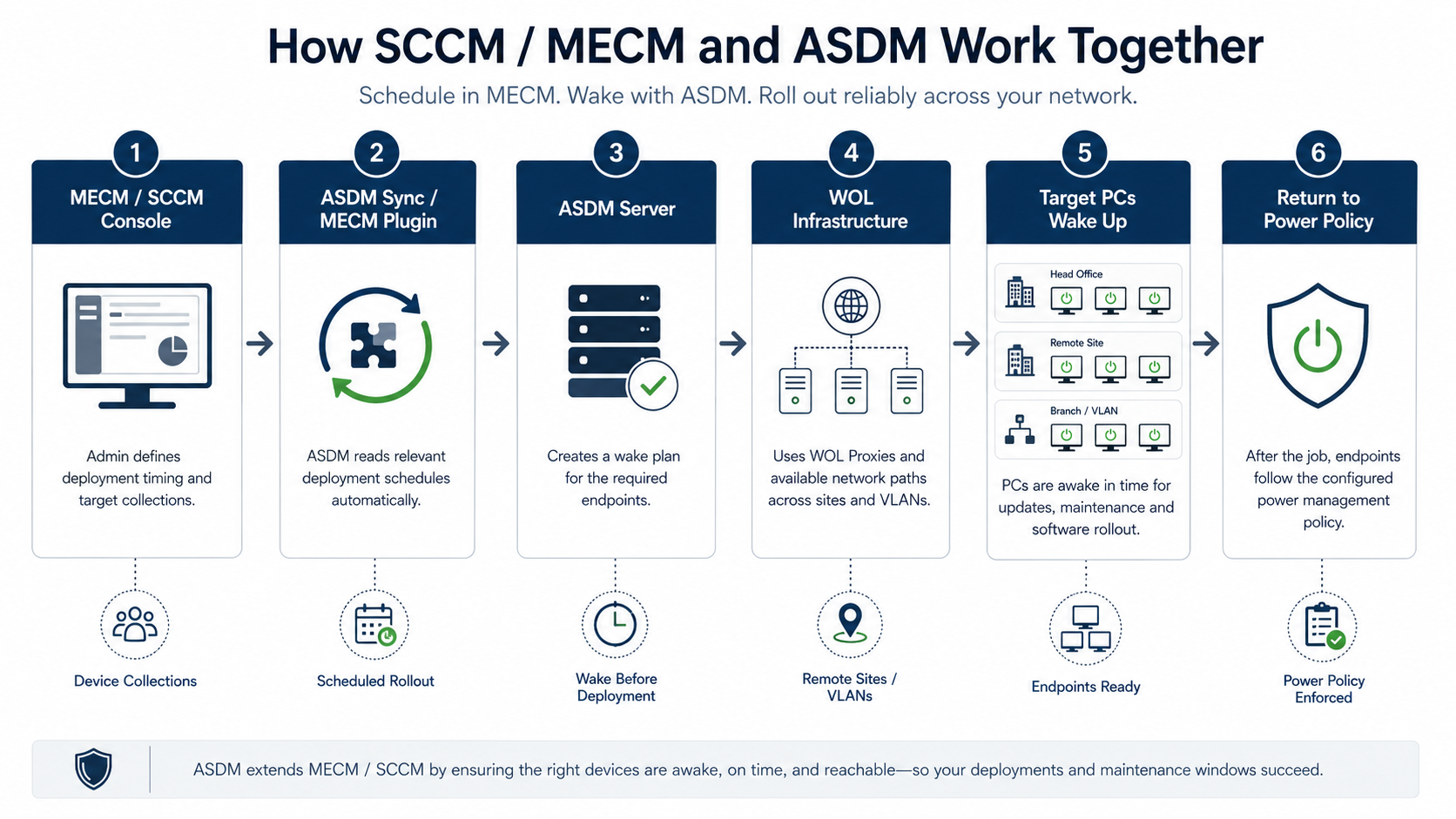
Schedule in MECM
Deployment timing and Device Collections remain in the Microsoft Configuration Manager workflow.
Wake with ASDM
ASDM builds the wake plan and uses configured WOL infrastructure, including WOL Proxies where required.
Return to policy
After the job, endpoints can follow the configured ASDM power policy instead of staying online by habit.
Before rollout: Wake reliability still depends on client state, firmware, adapter settings, WOL Proxy placement, routing and firewall rules. Validate the wake path in your own network before relying on broad rollout.
Our MECM (SCCM) integration
ASDM brings wake and power management into the MECM (SCCM) workflow.
Our MECM (SCCM) plugin supports Microsoft System Center Configuration Manager and Microsoft Endpoint Configuration Manager environments. It synchronizes deployment timing for WOL, provides on-demand wake and shutdown actions in the MECM console, and handles deployments based on Device Collections.
MECM plugin
Our MECM (SCCM) plugin supports Configuration Manager environments, including SCCM 2012 R2 and newer.
WOL schedule sync
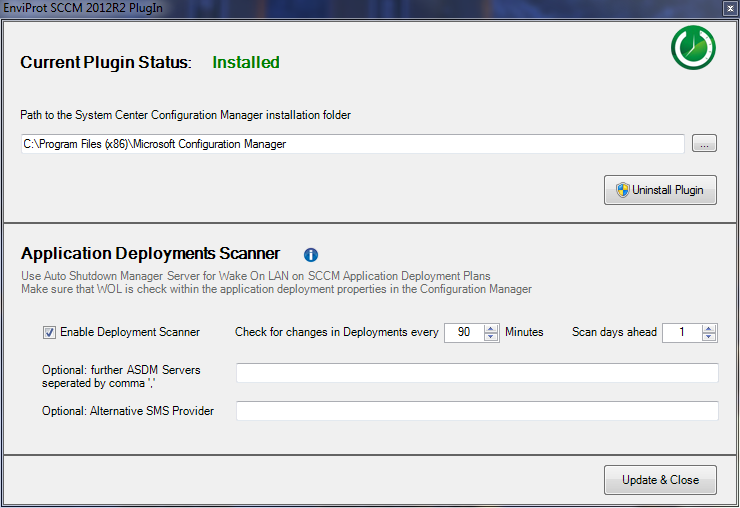
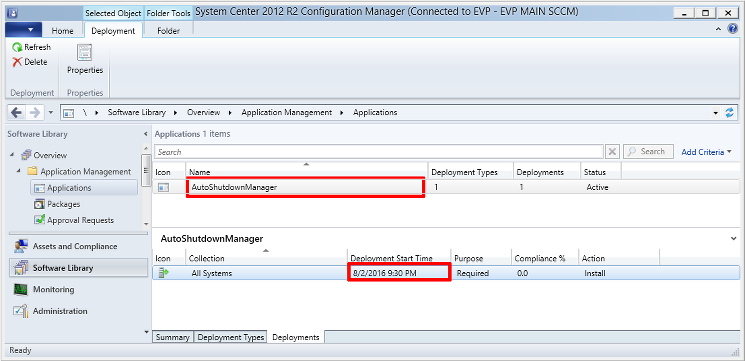
ASDM can synchronize WOL timing with MECM deployment timing so PCs can be prepared before the maintenance work starts.
Device Collections
ASDM handles deployments based on Device Collections, so it fits into existing Configuration Manager workflows.
Console actions
Wake and shutdown actions where IT already works.
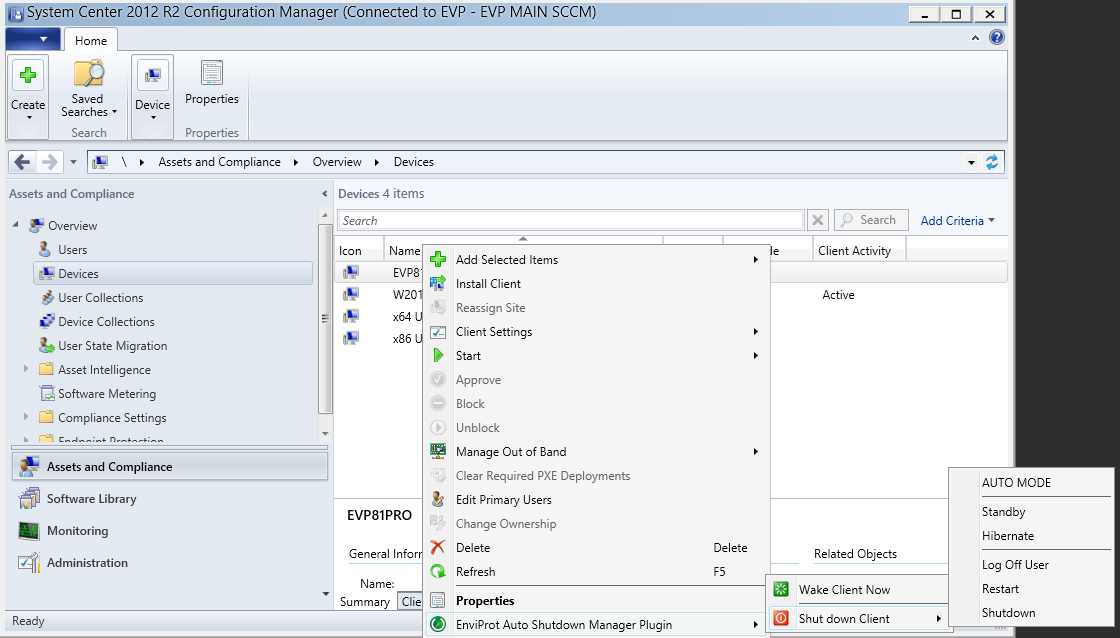
For administrators, the value is not another isolated tool. The integration can expose on-demand wake and shutdown actions in the MECM console context, while ASDM handles the endpoint power logic behind those actions.
On-demand Wake-on-LAN
Wake selected endpoints when an administrator needs availability for deployment, support or operational work.
On-demand shutdown
Trigger controlled shutdown actions after work is complete, without turning endpoint power management into ad-hoc scripts.
Important positioning
ASDM complements Microsoft endpoint management. It does not replace it.
Microsoft Configuration Manager, Intune and Group Policy remain responsible for endpoint management, deployment and policy areas. ASDM focuses on the power and wake process around those tools: when PCs should be awake, when they can shut down, and how endpoint availability can be made operationally reliable.
Where ASDM adds value
MECM manages the job. ASDM manages the power state around the job.
This distinction matters. The goal is not to replace Microsoft Configuration Manager, but to remove the power-state friction that can cause deployments, updates and remote work to miss their window.
Console
MECM (SCCM) integration in ASDM
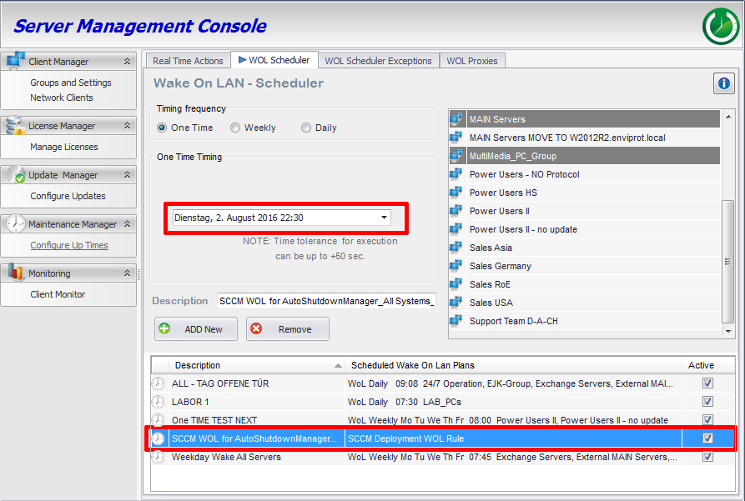
The screenshots below show our MECM (SCCM) plugin in practice: plugin configuration, Configuration Manager console actions, an MCM deployment schedule and the corresponding ASDM WOL Scheduler entry. Together, they show how ASDM works alongside Microsoft Configuration Manager without replacing it.
Terminology
SCCM, MECM and Microsoft Configuration Manager refer to the same product family.
Many IT teams still say SCCM. Microsoft has used names such as System Center Configuration Manager and Microsoft Endpoint Configuration Manager, and today the product is commonly referred to as Microsoft Configuration Manager.
FAQ
Questions Microsoft Configuration Manager teams usually ask first
Does ASDM replace MECM, SCCM, Intune or Group Policy?
No. ASDM complements Microsoft endpoint-management tools. MECM, Intune and GPO remain responsible for deployment, configuration and policy areas. ASDM focuses on endpoint power state, wake readiness, controlled shutdown and reporting around those tools.
Can ASDM wake PCs for MECM deployments?
Yes, ASDM can synchronize WOL timing with MECM (SCCM) deployment timing so endpoints can be prepared before software deployments or updates run, where WOL and network conditions support it.
Can administrators trigger wake and shutdown from the MECM console?
Yes. Our MECM (SCCM) plugin supports on-demand WOL and shutdown actions directly from the Configuration Manager console.
Does the integration work with User Collections?
ASDM handles deployments based on Device Collections. Device-based targeting fits the endpoint power-management use case because wake and shutdown actions apply to physical or virtual endpoint devices.
What Microsoft Configuration Manager versions are referenced?
In our current ASDM manual, we document support for Microsoft System Center Configuration Manager / MECM (SCCM) 2012 R2 and newer. Please also validate the exact integration requirements for your MECM environment.
What happens after the deployment is done?
That depends on the configured ASDM policies. Endpoints can remain available, shut down, restart or return to another configured power state where appropriate.
MAKE DEPLOYMENTS POWER-AWARE
Use Microsoft Configuration Manager for deployment — and ASDM for endpoint availability around it.
Start with a pilot around maintenance windows, deployment timing or wake reliability. Validate how ASDM can keep endpoints available for MECM work while reducing unnecessary runtime outside those windows.