 DE
DE  EN
EN 
Solutions · Remote Work / Wake-on-Demand
Remote Work Without Leaving Office PCs Running 24/7
Authorized users can wake assigned office PCs through the self-hosted WOL Portal, then connect with their usual remote desktop or support software. Existing VPN and access controls remain in place. PCs can stay off between sessions.
The availability problem
Wake the office PC before connecting
ASDM wakes the assigned PC. Your remote access software handles the connection, with the same VPN and login requirements as before.
Home-office access
An employee can request an authorized office PC before starting the normal remote connection.
After-hours work
A permitted endpoint can be made available when business access is needed outside its normal runtime.
Helpdesk support
Support staff can assist with a controlled wake request when self-service is not suitable.
Distributed locations
The same managed wake infrastructure can support routed networks, branch sites and other configured locations.
How users connect
Sign in, choose your PC, wake it and connect
The portal controls the wake request. The ASDM Server performs Wake-on-LAN through the configured enterprise wake path. The organisation’s existing remote-access stack continues to control the actual user session.
Step 1
Authenticate
The user signs in through the configured SAML 2.0 flow or through a portal-managed login.
Step 2
Resolve authorized PCs
The portal builds the allowed-target list from Active Directory assignments, portal-managed assignments or both.
Step 3
Select and submit Wake
The user chooses an allowed endpoint and submits the wake request from the portal.
Step 4
ASDM performs Wake-on-LAN
The ASDM Server sends the request through the configured local, proxy, routed or Wake-on-WAN path.
Step 5
Connect through the existing stack
After the endpoint becomes available, the user connects through VPN, RDP, VDI, remote support or another approved solution.
Step 6
Return to policy
After remote use, configured ASDM runtime, idle and shutdown rules can apply again when endpoint conditions permit.
Users and PC assignments
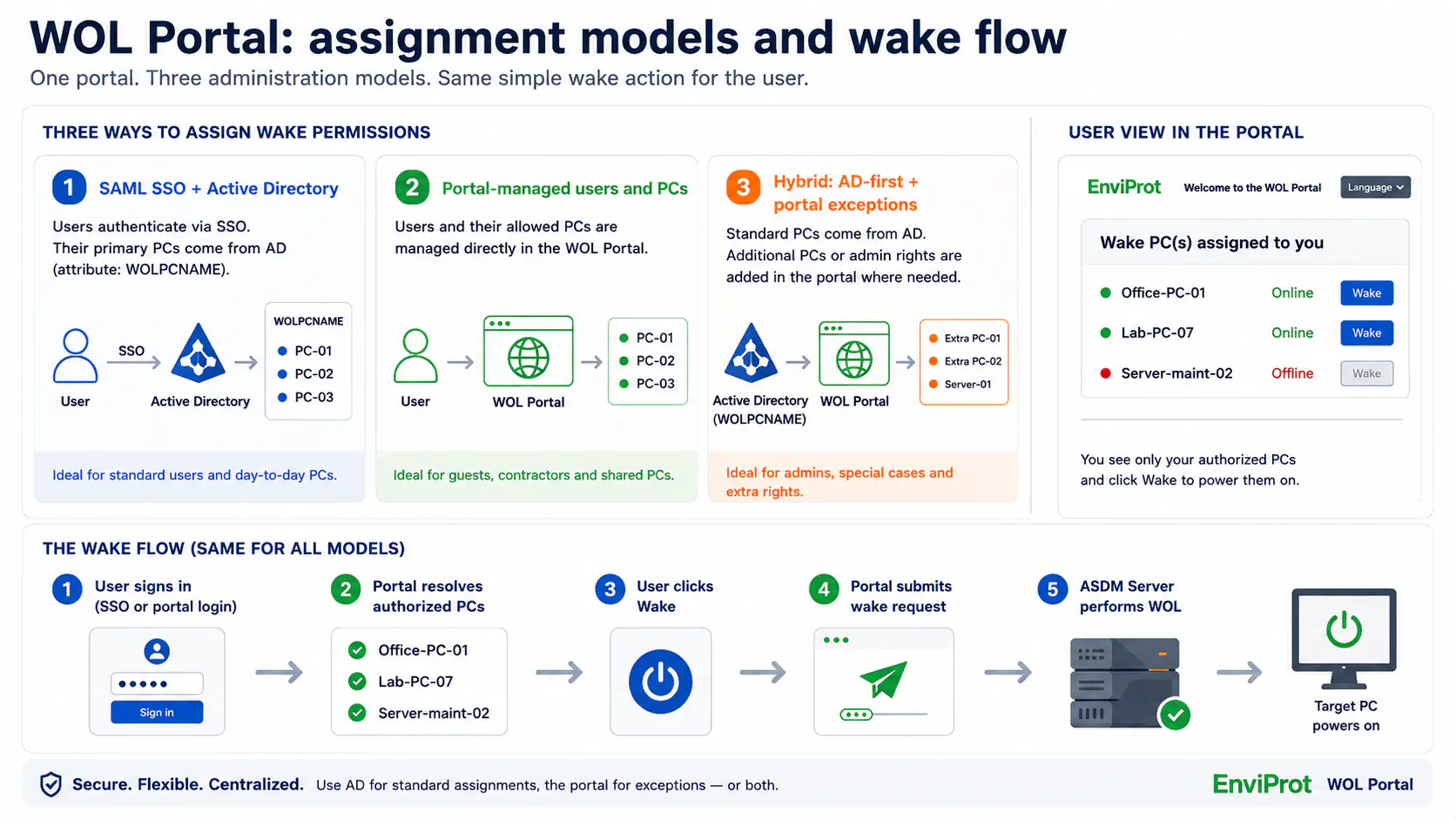
IT decides which users can see and wake which endpoints.
The Advanced WOL Portal can use an Active Directory-first model, direct portal administration or a hybrid of both. The assignment model changes how the allowed-PC list is built; it does not change the ASDM wake path behind the portal.
SAML SSO + Active Directory
Use the authenticated corporate identity and maintain primary user-to-PC assignments in Active Directory where that model is configured.
Portal-managed users and PCs
Manage portal accounts, roles and direct PC assignments inside the portal for non-SSO environments or separate operational workflows.
Hybrid: AD first, portal exceptions
Keep normal office-PC assignments in Active Directory while granting selected users additional lab, shared or exceptional systems through portal administration.
Plan Active Directory integration as an infrastructure change.
Where AD-based assignments are used, validate the attribute design, permissions, replication and rollback approach in a test environment before production rollout. Direct portal assignments remain available where an AD extension is not the preferred model.
Product proof
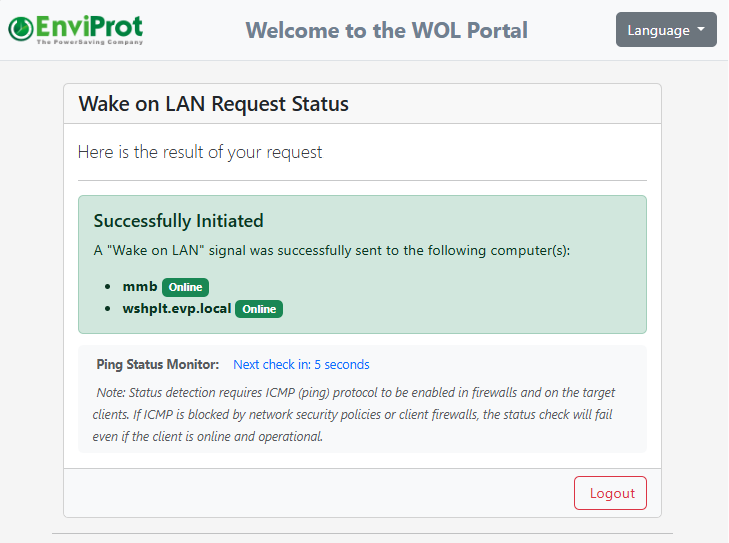
The user sees permitted targets and receives feedback after submitting Wake.
The screenshots show the allowed PCs in the Advanced WOL Portal and the result of a wake request.

Clear responsibility boundaries
ASDM provides controlled wake availability. Your remote-access platform provides the session.
Keeping these responsibilities separate makes the architecture easier to evaluate: the portal and ASDM decide whether an authorized endpoint should be made available; the existing access stack remains responsible for secure connectivity and user-session controls.
WOL Portal + ASDM wake control
- Identify the portal user through the configured login flow
- Resolve the endpoints that user is permitted to wake
- Forward the selected request to the ASDM Server
- Perform Wake-on-LAN through the configured enterprise infrastructure
- Allow configured power policies to apply again afterwards
Existing remote-access and security tools
- VPN, RDP, VDI, remote support or application access
- Remote-session authentication and authorization
- Transport security and access logging
- Endpoint protection, patching and hardening
- Application and data-access policy
Why the workflow needs controlled wake-up
Remote access solves the connection. ASDM closes the endpoint-availability gap around it.
The operational requirement is not just to send a Magic Packet. IT needs controlled assignments, a workable path through real networks and a way to avoid permanent runtime once remote access is no longer needed.
Expose only permitted endpoints
Self-service wake must not become unrestricted access to arbitrary company systems.
Remote-session rights do not automatically define wake rights
A VPN or RDP entitlement does not by itself build the portal list of PCs a user is allowed to wake.
Resolve an authorized target list
Use Active Directory assignments, portal-managed assignments or both to build the permitted-PC workflow.
Reach the target network segment
The request may need to reach another VLAN, routed site or WAN-connected location.
A basic WOL packet may stop at the network boundary
Broadcast assumptions often fail across segmented enterprise networks without a suitable delivery design.
Use the configured enterprise wake path
ASDM can use local WOL, WOL Proxy, routed or Wake-on-WAN patterns where the environment is designed and configured for them.
Avoid permanent always-on runtime
Remote availability should not require every office PC to remain powered around the clock.
Always-on becomes the fallback when wake is unreliable
Teams may leave endpoints running to avoid a failed remote-access start, even when the PCs are rarely needed.
Wake when needed, then return to policy
After the session, configured idle, runtime and shutdown policies can apply again when user and endpoint conditions permit.
The building blocks
Use the ASDM components that match your users and network topology.
WOL Portals
Self-hosted user and helpdesk wake workflows with controlled assignments, optional SAML SSO and direct portal administration.
WOL Proxy & Wake-on-WAN
Managed wake delivery for segmented networks, VLANs, sites and other routed environments.
Enterprise Wake-on-LAN
The broader wake infrastructure, monitoring and availability patterns behind managed endpoint wake-up.
Remote PC Power Control
The separate IT-admin workflow for centrally waking, restarting or shutting down managed endpoints.
Validate the complete path, not only the portal screen.
Wake behaviour depends on compatible endpoint hardware, firmware and adapter settings, the current power state, network routing, the configured ASDM wake method and organisational policy. Pilot representative users, endpoints and network segments before wider rollout.
Important boundary
Wake-on-demand is not a remote desktop or endpoint-security product.
The WOL Portal provides controlled wake availability. It does not replace VPN, RDP, VDI, remote-support or endpoint-security systems. Authentication, secure remote sessions, endpoint protection, patching and hardening remain separate responsibilities. Power management is not a security product, although reducing avoidable endpoint runtime can support a smaller operational exposure window.
FAQ
Common questions about remote work and wake-on-demand
Does ASDM replace our VPN, Remote Desktop or VDI platform?
No. ASDM handles controlled endpoint wake availability. Your existing VPN, RDP, VDI, remote-support or application-access solution continues to handle the remote session.
Can users wake only the PCs assigned to them?
The Advanced WOL Portal resolves the targets a signed-in user is permitted to wake from Active Directory assignments, portal-managed assignments or both. The exact rights depend on the configuration chosen by IT.
How can IT manage normal assignments and exceptions?
Primary office-PC assignments can remain in Active Directory where that model is configured. Additional lab, shared or exceptional targets can be assigned directly in the portal, creating an AD-first hybrid model.
Does every VPN automatically provide SAML single sign-on to the portal?
No. SSO applies when the corporate VPN or access flow and the WOL Portal are configured with the SAML 2.0 identity provider. The complete claims and portal integration must be validated in the customer environment.
Can the wake request cross VLANs or reach another site?
Yes, where the appropriate local WOL, WOL Proxy, routed or Wake-on-WAN method is configured and the endpoint hardware, network design and security policies support it.
What happens after the remote-work session ends?
The endpoint can return to the configured ASDM runtime, idle or shutdown policy once the relevant user activity, application and endpoint conditions permit.
Remote availability without permanent runtime
Test the portal, assignments, wake path and existing remote-access connection in your own environment.
Start with representative users, office PCs and network segments. Validate authentication, authorized targets, Wake-on-LAN delivery, the remote session and return-to-policy behaviour before expanding the rollout.