
 DE
DE  EN
EN Why Auto Shutdown Manager · Enterprise Wake-on-LAN
Enterprise Wake-on-LAN vs. Basic Wake-on-LAN Tools
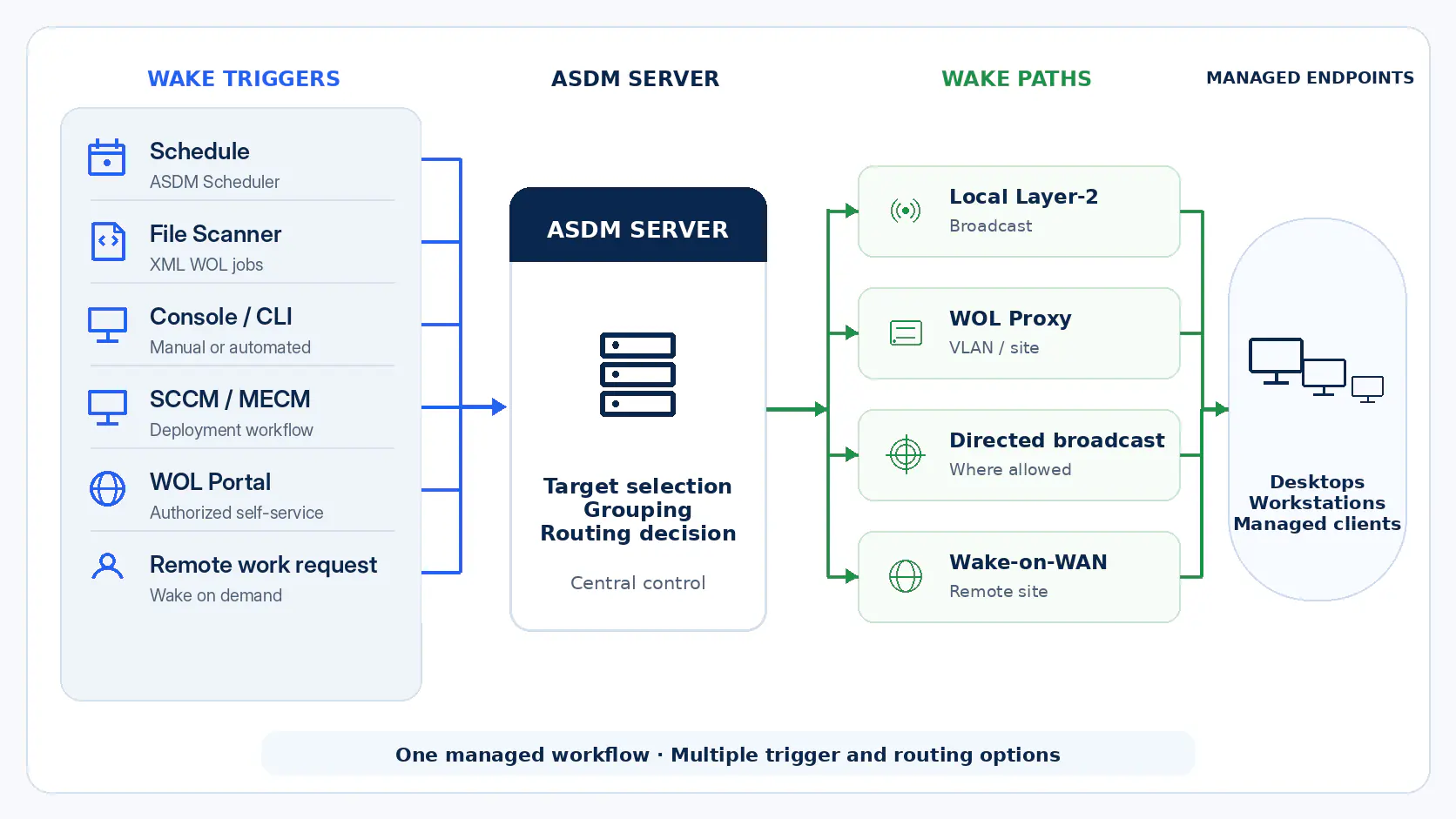
Basic Wake-on-LAN tools can be useful on a simple local network. Auto Shutdown Manager by EnviProt is different: it connects wake-up with managed endpoint power control, routed networks, WOL Proxy and Wake-on-WAN scenarios, WOL Portals, scheduled wake-up, File Scanner XML jobs and remote availability.
Fair comparison
Basic Wake-on-LAN is not the problem. Enterprise networks are.
A simple WOL tool can send a wake request. That may be enough for a small LAN, a lab bench or a one-off support task. The challenge starts when wake-up must work across routed subnets, VLANs, branch offices, remote users, maintenance windows and energy-saving shutdown policies.
Where basic WOL tools can fit
- Small local networks with predictable broadcast behavior.
- Manual wake-up of a known device by an administrator.
- Occasional troubleshooting or lab use.
- Simple environments where clients stay reachable and network routing is not a concern.
Where enterprise Wake-on-LAN is different
- Wake-up across VLANs, routed subnets and remote sites.
- WOL Proxy, directed-broadcast, Wake-on-WAN or special-case remote-address approaches where the network requires them.
- User-facing wake-up through controlled WOL Portals.
- Scheduled, portal-driven or XML job based wake-up for maintenance, patching, support and reliable availability after shutdown.
Visual quick scan
What changes for the administrator?
Basic WOL tools send a packet. Auto Shutdown Manager gives IT a managed wake workflow: trigger, route, verify and support endpoints across complex networks with less manual firefighting.
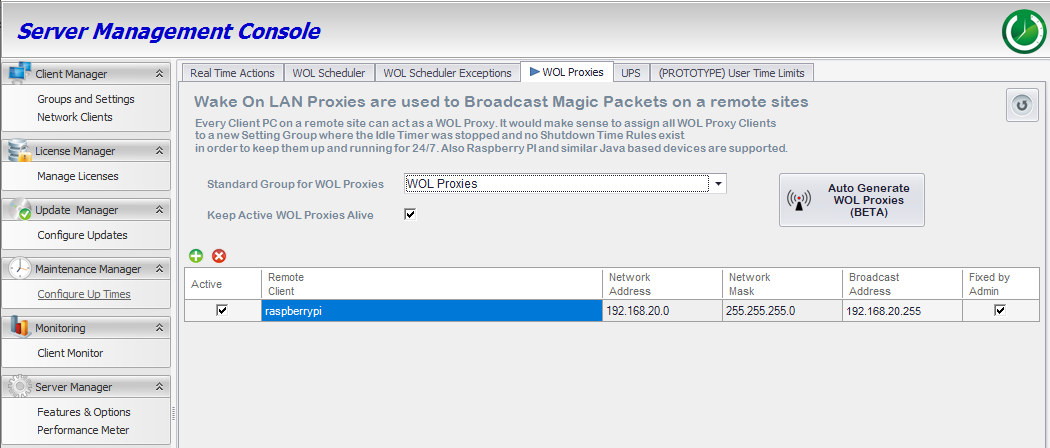
Route wake-ups through the right site path
WOL Proxy routing helps IT generate the wake packet inside the target network segment where local broadcast is needed.
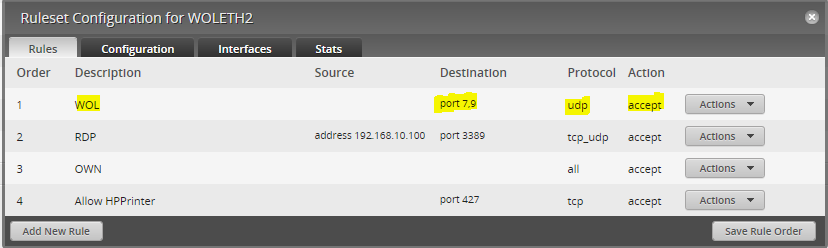
Support routed broadcast where policy allows it
Directed broadcast remains a network-controlled path. ASDM can fit that path where routers and security policy allow routed broadcast forwarding.
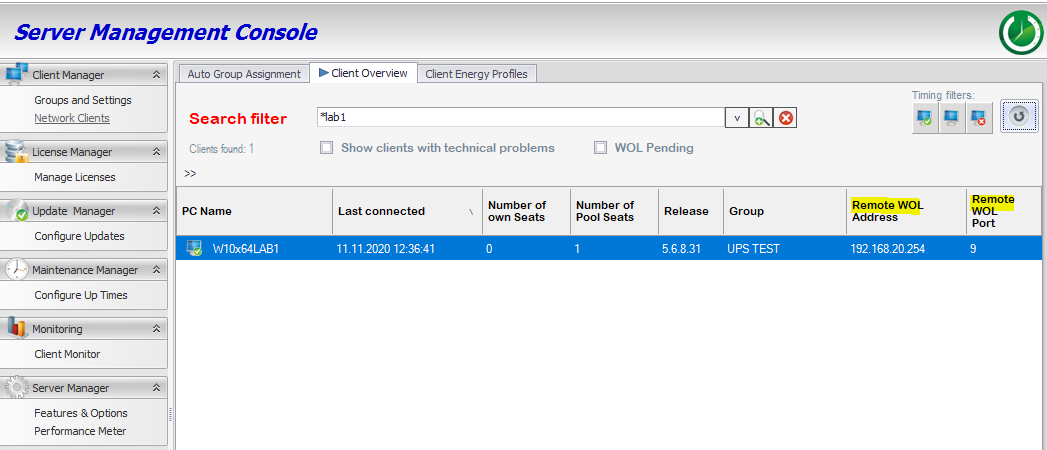
Handle special router cases centrally
Remote WOL Address / Port is available for special router topologies, such as static-ARP or broadcast-target cases, instead of leaving every exception in separate scripts.
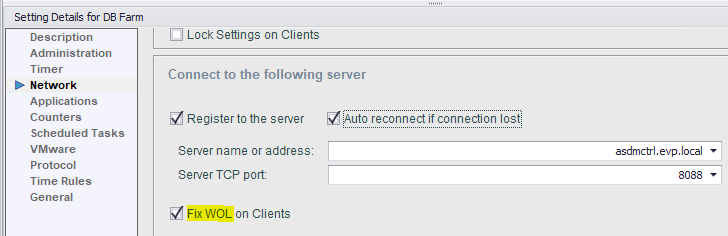
Reduce client-side wake failures
Wake reliability is not only routing. ASDM helps keep client-side wake settings part of policy instead of repeated per-PC troubleshooting.
Less manual scripting
Wake-up becomes part of a managed workflow instead of scattered tools, one-off scripts and remembered router exceptions.
More reliable operations
Routing choices, client readiness and policy control are handled together, which reduces avoidable failure points.
Safer administration
IT can keep endpoint availability without leaving machines powered on simply because wake-up is unreliable.
Professional handover
Admins can explain the wake path, the exception path and the support model without relying on tribal knowledge.
Operational difference
Enterprise Wake-on-LAN is part of an endpoint power-management workflow.
Wake-up becomes reliable when it is designed together with shutdown, user access, network routing, central policy and maintenance operations. Otherwise, IT saves power only to create a new availability problem.
1. Shutdown first
Power savings begin with safely shutting down idle or unused PCs. Wake-up only has value if the device can be brought back when users, admins or maintenance tasks need it.
2. Route the wake request
Enterprise networks often block or limit simple broadcast behavior. ASDM supports WOL Proxy routing, directed broadcast where the network allows it, and Remote WOL Address / Port settings as a special-case override for router topologies that need a static-ARP or broadcast-target path.
3. Keep control local
Self-hosted WOL Portals can let authorized users or helpdesk teams wake assigned PCs without keeping those systems running all day.
4. Align with maintenance
Scheduled, immediate or File Scanner XML job based wake-up helps keep endpoints available for support, patch windows and planned administration without abandoning power-saving behavior.
5. Complement existing management tools
ASDM is not positioned as a replacement for Microsoft Configuration Manager or similar endpoint-management platforms. It can complement them with a dedicated power and wake layer around maintenance, support and availability workflows.
6. Reduce failure points
Client readiness matters as much as network routing. Wake settings, hardware behavior and power states need to be part of the operating model, not left to ad-hoc tools.
7. Prove the result
Wake reliability protects the energy-saving case. If PCs cannot return when needed, the organization will fall back to leaving them on.
Requirement map
What basic tools usually do not cover as a complete process
The difference is not just the magic packet. It is the controlled path from “PC is safely off” to “PC is available again”.
Wake across VLANs and routed subnets
Basic WOL tools: Often depend on local broadcast behavior or manual network exceptions.
ASDM layer: Supports enterprise WOL routing approaches so wake-up can fit segmented endpoint networks.
WOL Proxy, directed broadcast and special routing cases
Basic WOL tools: Usually require separate scripts, router-specific exceptions or manual site-by-site configuration.
ASDM layer: Lets IT use WOL Proxy routing, directed broadcast where the network allows it, or Remote WOL Address / Port as a special-case override where the environment requires it.
Remote users and helpdesk wake-up
Basic WOL tools: Give admins a wake command, but do not solve controlled user self-service or remote-work wake-on-demand.
ASDM layer: WOL Portals can let authorized users wake assigned PCs while IT keeps authentication, assignment and ASDM wake routing under control.
Scheduled and automated wake for operations
Basic WOL tools: Often handle manual wake-up, but not the wider maintenance schedule, external job input or automation workflow.
ASDM layer: Supports scheduled, immediate and File Scanner XML job based wake-up as part of central endpoint power-state control.
Existing management-tool fit
Basic WOL tools: May sit beside Microsoft Configuration Manager or other endpoint tools, but usually remain separate one-off wake utilities.
ASDM layer: Complements SCCM/MCM and similar tools with a dedicated power and wake layer instead of replacing endpoint management.
Client readiness and wake reliability
Basic WOL tools: Can send a packet, but do not make firmware, NIC settings, power states or network paths reliable by themselves.
ASDM layer: Keeps client readiness, wake settings and operational validation part of the managed endpoint power process.
Power saving without losing availability
Basic WOL tools: Do not decide when a PC should safely shut down or how to avoid disrupting users.
ASDM layer: Combines shutdown policies, wake reliability and maintenance availability in one power-management workflow.
Operational proof
Basic WOL tools: Usually prove only that a wake command was sent.
ASDM layer: Helps connect power-state control with reporting, ROI validation and a measurable energy-management process.
Enterprise scenarios
Where enterprise Wake-on-LAN matters most
Wake-on-LAN is most valuable when the organization can shut down confidently and still recover availability for real work.
Branch offices
Wake endpoints across segmented locations without treating every router or site as a separate custom project.
Patch windows
Wake clients for planned administration, updates and support work, then return to power-saving behavior afterwards.
Remote work
Let authorized users wake assigned office PCs on demand instead of keeping those PCs running 24/7.
Shared workstations
Keep labs, classrooms and shared endpoints power-managed while still available for schedules and support.
Practical adoption
A practical way to move beyond basic Wake-on-LAN tools
Do not start by replacing every tool. Start where basic WOL creates the most operational risk: routed sites, remote users, failed wake-ups and maintenance availability.
Map the topology
List the subnets, VLANs, sites and user groups where wake-up needs to work reliably.
Choose the route
Decide where local broadcast, directed broadcast, WOL Proxy routing, Wake-on-WAN or special-case Remote WOL Address / Port settings fit the environment.
Protect availability
Connect wake-up with safe shutdown policies, maintenance windows and user or helpdesk access paths.
Validate in a pilot
Use a controlled site, lab or department to verify wake reliability before scaling the workflow.
Availability and exposure
Power management is not a security product. But unnecessary runtime can mean unnecessary exposure.
Enterprise Wake-on-LAN supports a balanced operating model: shut down endpoints when they are not needed, then wake them reliably for users, support and maintenance. Endpoint protection, patching and hardening remain separate responsibilities.
Reduce avoidable runtime
Power-managed endpoints do not need to stay on simply because wake-up is unreliable.
Preserve access
WOL Portals and central wake operations help restore availability when the endpoint is needed.
Keep responsibilities clear
ASDM supports operational exposure reduction, but it does not replace endpoint security tools.
FAQ
Common questions about enterprise Wake-on-LAN
Why are basic Wake-on-LAN tools not enough in many enterprise networks?
Basic tools can work well on a simple LAN. Enterprise networks often include routed subnets, VLANs, branch offices and remote access requirements. Wake-up then needs routing, policy, user control and operational validation.
Does ASDM require every router to be reconfigured?
No single approach fits every network. Auto Shutdown Manager supports practical enterprise WOL approaches such as WOL Proxy scenarios, directed broadcast where the network and security policy allow routed broadcast forwarding, and Remote WOL Address / Port as a special-case override where the environment requires it.
Does ASDM replace SCCM/MCM or Microsoft Configuration Manager?
No. Microsoft Configuration Manager has its own Wake-on-LAN functions for deployment and maintenance scenarios. ASDM should be used as a complementary power and wake layer where endpoint availability, shutdown policy, portals, routing and proof need to be managed together.
Can ASDM create wake jobs from files or external workflows?
Yes. The Auto Shutdown Manager File Scanner can process XML job files, so wake-up can be connected to structured operational workflows instead of only manual button clicks.
Is Wake-on-LAN guaranteed to work in every power state?
No. Wake success depends on compatible endpoint hardware, firmware and NIC settings, the current power state and a working network path. Enterprise Wake-on-LAN reduces operational uncertainty, but it does not remove those technical dependencies.
Can users wake their own office PCs?
Yes, WOL Portals can provide controlled self-service wake-up for assigned PCs. IT keeps control over access, assignment and routing instead of leaving PCs running all day.
How does Wake-on-LAN connect to energy savings?
Energy savings depend on being able to shut down safely without losing availability. Enterprise Wake-on-LAN gives IT a path to wake endpoints again for users, support and maintenance after power-saving shutdown.
Should we replace every existing WOL tool?
Not necessarily. Keep simple tools where they are low-risk and useful. Use ASDM where wake-up is part of a managed endpoint power process with routed networks, remote users, maintenance windows and savings proof.
Stop choosing between power savings and endpoint availability.
Use Auto Shutdown Manager to connect safe shutdown, Enterprise Wake-on-LAN, WOL Proxy and Wake-on-WAN routing, WOL Portals, automation, maintenance availability and reporting in one managed endpoint power workflow.