
 DE
DE  EN
EN Enterprise Wake-on-LAN for routed networks
Wake PCs and endpoints across local subnets, VLANs and remote locations without turning every router into a special-case configuration project. Auto Shutdown Manager combines scheduled wake-up, manual remote wake, WOL proxies and client-side reliability settings in one central power-management workflow.
Operational fit
Wake-on-LAN that fits real enterprise networks
Wake workflows rarely fail because of one missing button. They fail because schedules, routed networks, firewalls, client settings and support workflows are handled separately. This page brings those pieces together.
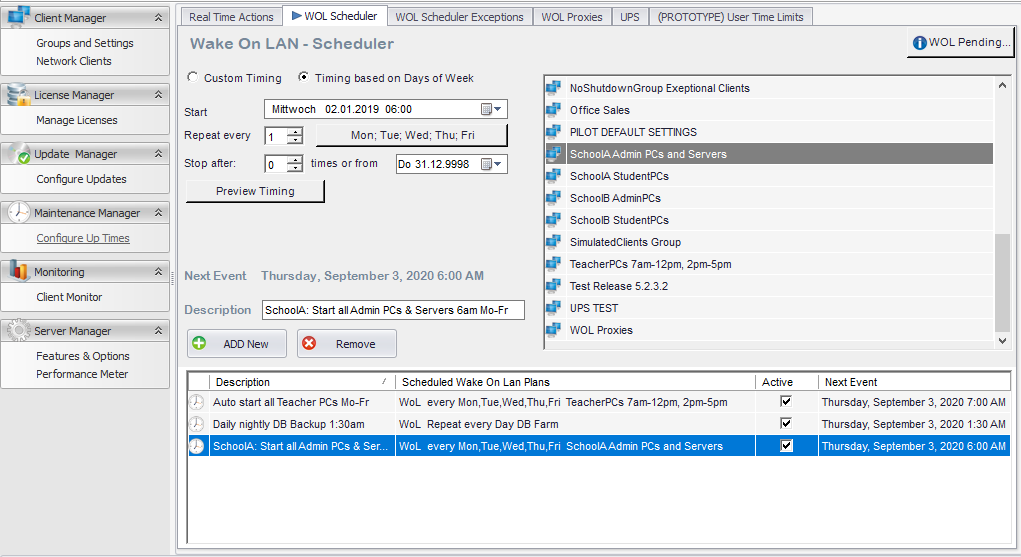
Trigger wake-ups from central workflows
- Built-in Central Scheduler
- XML Job File Scanner
- Manual one-click Wake-on-LAN from the console
- MCM/SCCM plugin integration
Reach clients beyond the local subnet
- Local subnet broadcasts
- Directed broadcasts where permitted by security policy
- WOL proxy routing for remote locations
- Remote WOL address and port configuration
Reduce client-side WOL failures
- Helps configure Wake on Magic Packet
- Helps handle Windows Fast Startup related WOL issues
- Policy-based client settings
- Hardware, firmware and network policy may still apply
Architecture
Designed for distributed endpoint environments
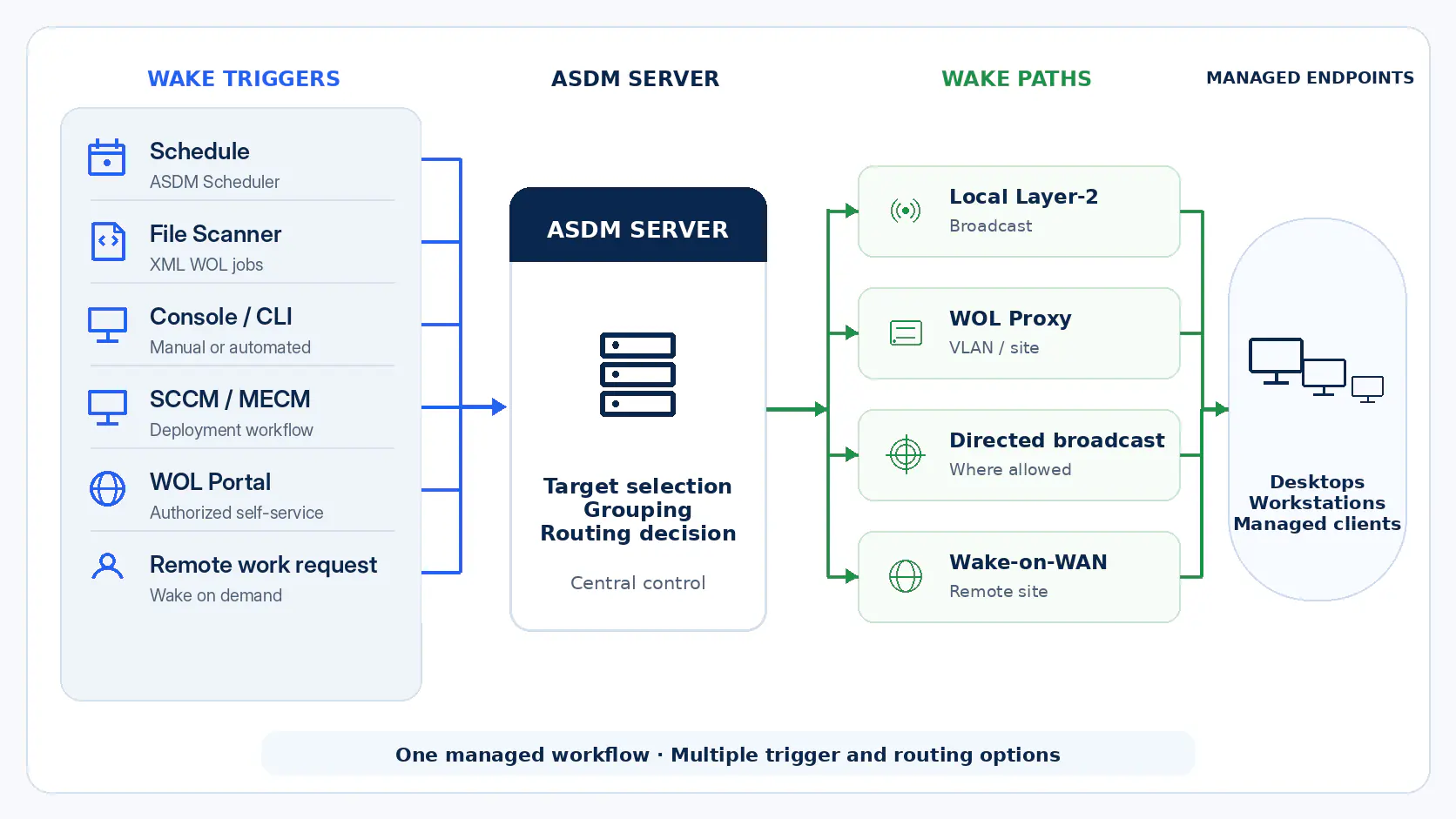
Auto Shutdown Manager can wake endpoints from the central console while routing WOL traffic through the approach that fits the site: local broadcast, directed broadcast or a WOL proxy in the target network.
The proxy approach is especially useful where broadcast forwarding is restricted, undesirable or too expensive to maintain per router and per subnet.
Routing options
Two practical ways to wake clients across subnets
Different organizations handle broadcast traffic differently. Auto Shutdown Manager supports multiple WOL routing approaches so administrators can choose the method that matches their network and security policy.
Method A
WOL Proxy routing
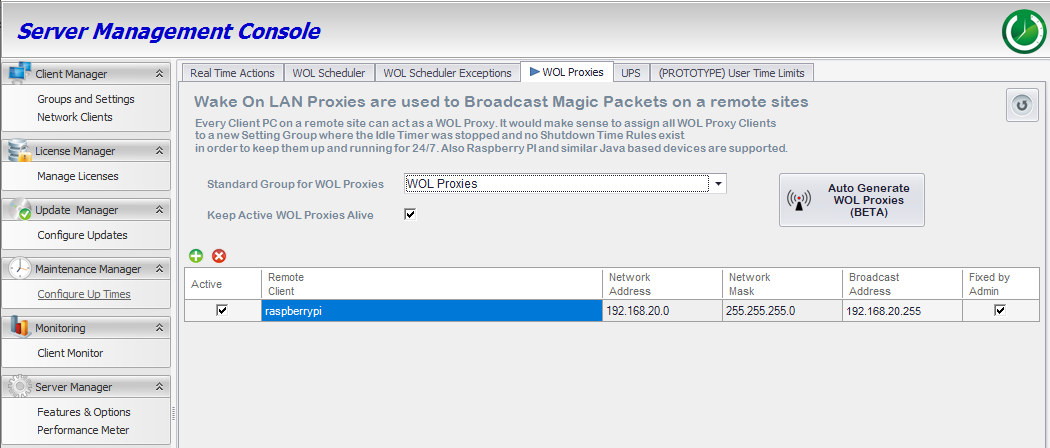
Place an existing endpoint, server, virtual machine or small Linux relay device — for example a Raspberry Pi in a branch office or remote VLAN — in the target subnet and use it as the local WOL sender. The server communicates with the proxy, and the proxy sends the wake packet inside the local network segment. This avoids broadcast forwarding changes in many deployments.
- Works well for routed VLANs and branch locations
- Can use lightweight relay devices such as a Raspberry Pi where a full server or VM is not practical
- Reduces dependency on router-specific broadcast configuration
- Can be managed through the Auto Shutdown Manager workflow
Method B
Directed broadcast, with static ARP where needed
For remote networks without an assigned WOL Proxy, Auto Shutdown Manager can use directed broadcasts automatically where the network and security policy allow routed broadcast forwarding. This normal directed-broadcast path does not require a manual Remote WOL Address / Port entry.
Where the network and security policy allow it, routers can be configured to forward controlled WOL traffic to a target broadcast address. Static ARP is only needed in special router topologies where a broadcast target must be mapped deliberately.
configure
set protocols static arp 192.168.20.254 hwaddr FF:FF:FF:FF:FF:FF
commit
save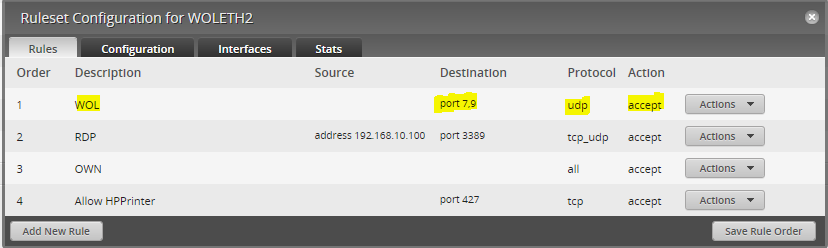
Special-case override
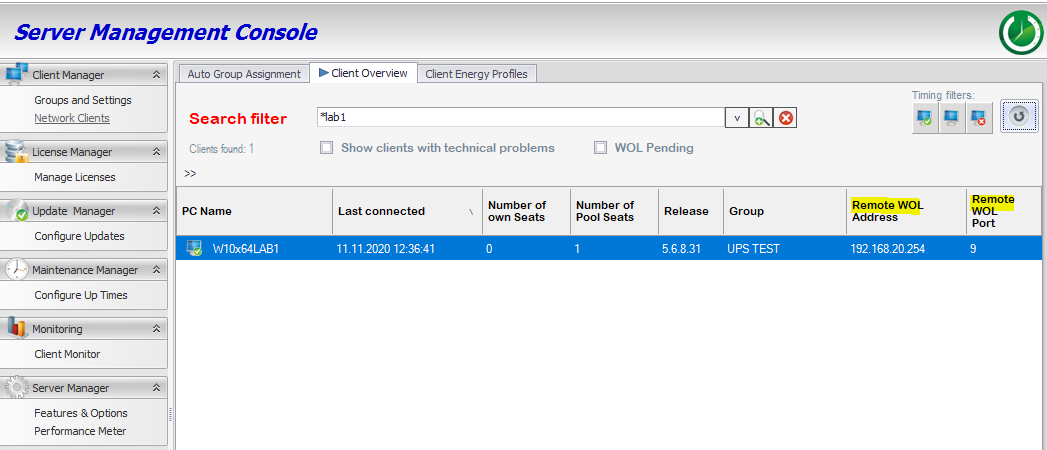
Remote WOL address / port for routers without remote broadcast support
Use a manual Remote WOL Address / Port entry only for special cases, for example when a router cannot forward remote broadcasts directly and the wake packet must be sent to a configured static-ARP or broadcast target.
For normal directed-broadcast routing, this manual override is not required. For multiple clients, apply remote WOL address and port settings in bulk only where the same special topology is shared.
Reliability
Client readiness matters as much as routing
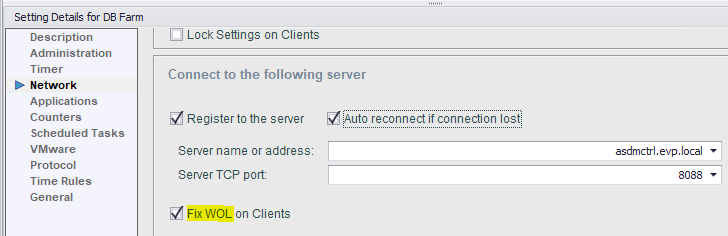
Wake-on-LAN depends on more than the server. Endpoint firmware, NIC driver settings, Windows Fast Startup, sleep or shutdown state and network policy can all affect whether a client wakes successfully.
Auto Shutdown Manager helps reduce these failures by managing supported client-side WOL settings centrally, including Wake on Magic Packet related settings and Windows Fast Startup handling where supported.
Use cases
Common enterprise scenarios
Patch windows and maintenance
Wake endpoints before planned maintenance, updates or software distribution windows.
Branch offices and routed VLANs
Reach endpoints in distributed network segments using proxy or routed WOL approaches.
Labs, classrooms and shared workstations
Prepare PCs before users arrive, then return them to power-saving policies afterwards.
Remote support and helpdesk wake-up
Allow support workflows to bring managed devices online when intervention is needed.
Energy management
Combine scheduled startup with shutdown policies to support predictable endpoint availability.
Self-service wake portals
Provide controlled wake-up options through portal workflows where this is part of the deployment.
Frequently asked questions
Wake-on-LAN questions for routed enterprise networks
Practical answers for IT teams planning Wake-on-LAN across VLANs, branch locations and managed endpoint environments.
Do I need a physical WOL Proxy in every VLAN?
No. A physical device is not required in every VLAN. Depending on your topology, you can use an existing endpoint, server, virtual machine or small Linux relay device in the target network segment. The important point is that the proxy can send the wake packet locally inside the subnet where the target PCs are located.
What is the difference between WOL proxies and directed broadcasts?
Directed broadcasts depend on network devices forwarding wake traffic toward a target subnet or broadcast address. A WOL proxy avoids that router-side broadcast dependency by placing a relay inside the target network segment. The better option depends on your routing design, security policy and operational preference.
Can Auto Shutdown Manager combine WOL proxies and directed broadcasts?
Yes. Auto Shutdown Manager can use both approaches in the same environment. If a WOL proxy is configured for a remote network, wake requests can be routed through that proxy. For remote networks without a configured WOL proxy, ASDM can fall back to directed-broadcast or remote-WOL-address based wake-up routing according to the configured network settings and security policy.
Can I use a Raspberry Pi as a Wake-on-LAN proxy?
Yes. A Raspberry Pi or another small Linux-based relay can be a practical option for branch offices, remote VLANs or locations where running a full server or virtual machine is not necessary. It should still be managed like any other infrastructure component: documented, monitored and placed in the correct target network segment.
How does Auto Shutdown Manager integrate with SCCM or Microsoft Configuration Manager?
Auto Shutdown Manager can support managed wake-up workflows around software deployment and maintenance windows. In environments using SCCM or Microsoft Configuration Manager, this helps align endpoint availability with scheduled updates, deployments and administrative tasks.
Managed endpoint availability
Make Wake-on-LAN part of managed endpoint power control
Use Auto Shutdown Manager to schedule, route and troubleshoot Wake-on-LAN from the same management environment used for endpoint power policies.