 DE
DE  EN
EN Home-office access
An employee can request an authorized office PC before starting the normal remote connection.

Solutions · Remote Work / Wake-on-Demand
Auto Shutdown Manager (ASDM) by EnviProt adds controlled wake availability to the remote-work process. Authorized employees or support staff can wake permitted office PCs through a self-hosted WOL Portal, then use the organisation’s existing VPN, Remote Desktop, VDI or remote-support tools for the actual session. Endpoints can remain shut down when they are not needed instead of running continuously just in case.
The availability problem
VPN, Remote Desktop, VDI and support tools handle the remote session. They do not by themselves solve the endpoint power-state problem. Wake-on-demand lets IT separate availability from permanent runtime: keep the office PC off when it is not needed, then make it available for an approved remote-work request.
An employee can request an authorized office PC before starting the normal remote connection.
A permitted endpoint can be made available when business access is needed outside its normal runtime.
Support staff can assist with a controlled wake request when self-service is not suitable.
The same managed wake infrastructure can support routed networks, branch sites and other configured locations.
The complete user journey
The portal controls the wake request. The ASDM Server performs Wake-on-LAN through the configured enterprise wake path. The organisation’s existing remote-access stack continues to control the actual user session.
Step 1
The user signs in through the configured SAML 2.0 flow or through a portal-managed login.
Step 2
The portal builds the allowed-target list from Active Directory assignments, portal-managed assignments or both.
Step 3
The user chooses an allowed endpoint and submits the wake request from the portal.
Step 4
The ASDM Server sends the request through the configured local, proxy, routed or Wake-on-WAN path.
Step 5
After the endpoint becomes available, the user connects through VPN, RDP, VDI, remote support or another approved solution.
Step 6
After remote use, configured ASDM runtime, idle and shutdown rules can apply again when endpoint conditions permit.
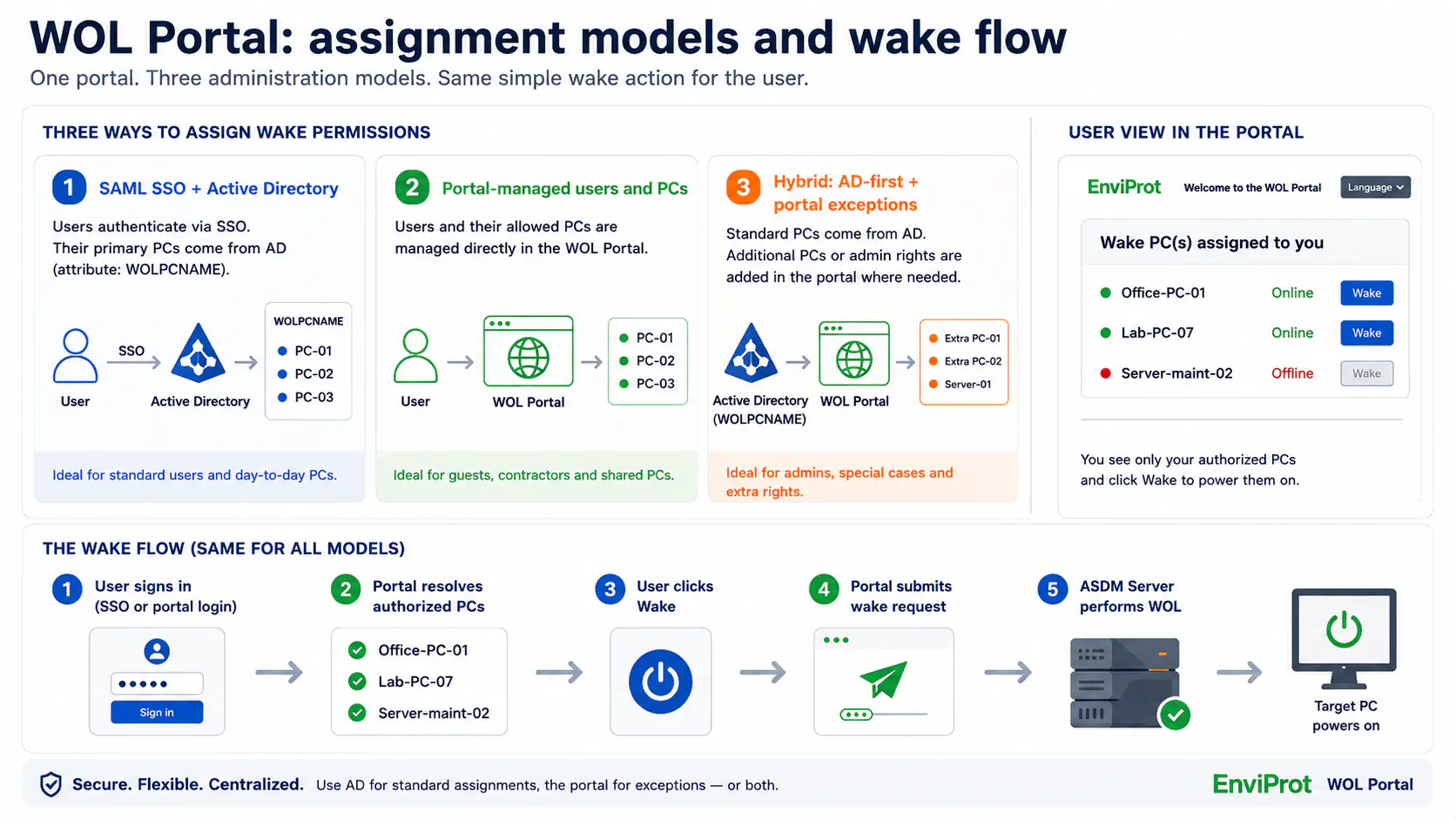
Controlled assignment models
The Advanced WOL Portal can use an Active Directory-first model, direct portal administration or a hybrid of both. The assignment model changes how the allowed-PC list is built; it does not change the ASDM wake path behind the portal.
Use the authenticated corporate identity and maintain primary user-to-PC assignments in Active Directory where that model is configured.
Manage portal accounts, roles and direct PC assignments inside the portal for non-SSO environments or separate operational workflows.
Keep normal office-PC assignments in Active Directory while granting selected users additional lab, shared or exceptional systems through portal administration.
Where AD-based assignments are used, validate the attribute design, permissions, replication and rollback approach in a test environment before production rollout. Direct portal assignments remain available where an AD extension is not the preferred model.
Product proof
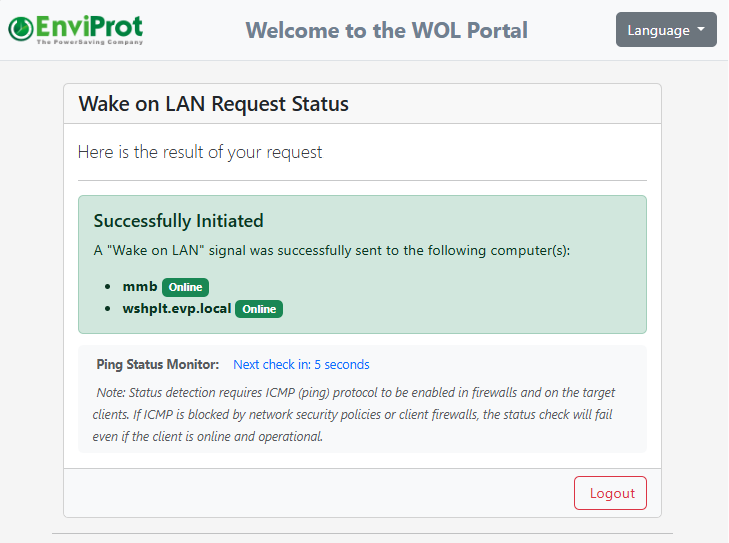
These are real Advanced WOL Portal screens. They show the controlled target list and the wake-request result without turning this solution page into a second portal manual.

Clear responsibility boundaries
Keeping these responsibilities separate makes the architecture easier to evaluate: the portal and ASDM decide whether an authorized endpoint should be made available; the existing access stack remains responsible for secure connectivity and user-session controls.
Why the workflow needs controlled wake-up
The operational requirement is not just to send a Magic Packet. IT needs controlled assignments, a workable path through real networks and a way to avoid permanent runtime once remote access is no longer needed.
Self-service wake must not become unrestricted access to arbitrary company systems.
A VPN or RDP entitlement does not by itself build the portal list of PCs a user is allowed to wake.
Use Active Directory assignments, portal-managed assignments or both to build the permitted-PC workflow.
The request may need to reach another VLAN, routed site or WAN-connected location.
Broadcast assumptions often fail across segmented enterprise networks without a suitable delivery design.
ASDM can use local WOL, WOL Proxy, routed or Wake-on-WAN patterns where the environment is designed and configured for them.
Remote availability should not require every office PC to remain powered around the clock.
Teams may leave endpoints running to avoid a failed remote-access start, even when the PCs are rarely needed.
After the session, configured idle, runtime and shutdown policies can apply again when user and endpoint conditions permit.
The building blocks
This solution page connects the complete remote-work workflow. The linked Platform and Solutions pages provide deeper product and architecture detail for each component.
Self-hosted user and helpdesk wake workflows with controlled assignments, optional SAML SSO and direct portal administration.
Managed wake delivery for segmented networks, VLANs, sites and other routed environments.
The broader wake infrastructure, monitoring and availability patterns behind managed endpoint wake-up.
The separate IT-admin workflow for centrally waking, restarting or shutting down managed endpoints.
Wake behaviour depends on compatible endpoint hardware, firmware and adapter settings, the current power state, network routing, the configured ASDM wake method and organisational policy. Pilot representative users, endpoints and network segments before wider rollout.
Important boundary
The WOL Portal provides controlled wake availability. It does not replace VPN, RDP, VDI, remote-support or endpoint-security systems. Authentication, secure remote sessions, endpoint protection, patching and hardening remain separate responsibilities. Power management is not a security product, although reducing avoidable endpoint runtime can support a smaller operational exposure window.
FAQ
No. ASDM handles controlled endpoint wake availability. Your existing VPN, RDP, VDI, remote-support or application-access solution continues to handle the remote session.
The Advanced WOL Portal resolves the targets a signed-in user is permitted to wake from Active Directory assignments, portal-managed assignments or both. The exact rights depend on the configuration chosen by IT.
Primary office-PC assignments can remain in Active Directory where that model is configured. Additional lab, shared or exceptional targets can be assigned directly in the portal, creating an AD-first hybrid model.
No. SSO applies when the corporate VPN or access flow and the WOL Portal are configured with the SAML 2.0 identity provider. The complete claims and portal integration must be validated in the customer environment.
Yes, where the appropriate local WOL, WOL Proxy, routed or Wake-on-WAN method is configured and the endpoint hardware, network design and security policies support it.
The endpoint can return to the configured ASDM runtime, idle or shutdown policy once the relevant user activity, application and endpoint conditions permit.
Remote availability without permanent runtime
Start with representative users, office PCs and network segments. Validate authentication, authorized targets, Wake-on-LAN delivery, the remote session and return-to-policy behaviour before expanding the rollout.
Solutions · Enterprise IT
Auto Shutdown Manager (ASDM) by EnviProt helps enterprise IT teams turn endpoint power control into a managed workflow: shut down safely, wake reliably, support maintenance and remote work, and prove the savings without building another script project.
The enterprise problem
Most enterprises already have Windows, Group Policy, Microsoft Configuration Manager, Intune and scripts. The gap appears when endpoint power state becomes a daily operating process across users, maintenance windows, routed networks, remote access and management reporting.
PCs are often left running because IT cannot risk missing maintenance, remote access or support availability. That protects availability, but it also wastes runtime.
Wake-on-LAN that works in one subnet can fail across VLANs, sites, routers and firewalls unless the wake path is designed as an enterprise workflow.
One-off shutdown and wake scripts can work for a while, then become hard to maintain, document, hand over and prove to management.
Visual quick scan
ASDM does not replace endpoint management. It coordinates power policy, user safety, wake routing, maintenance readiness, remote availability and savings proof.
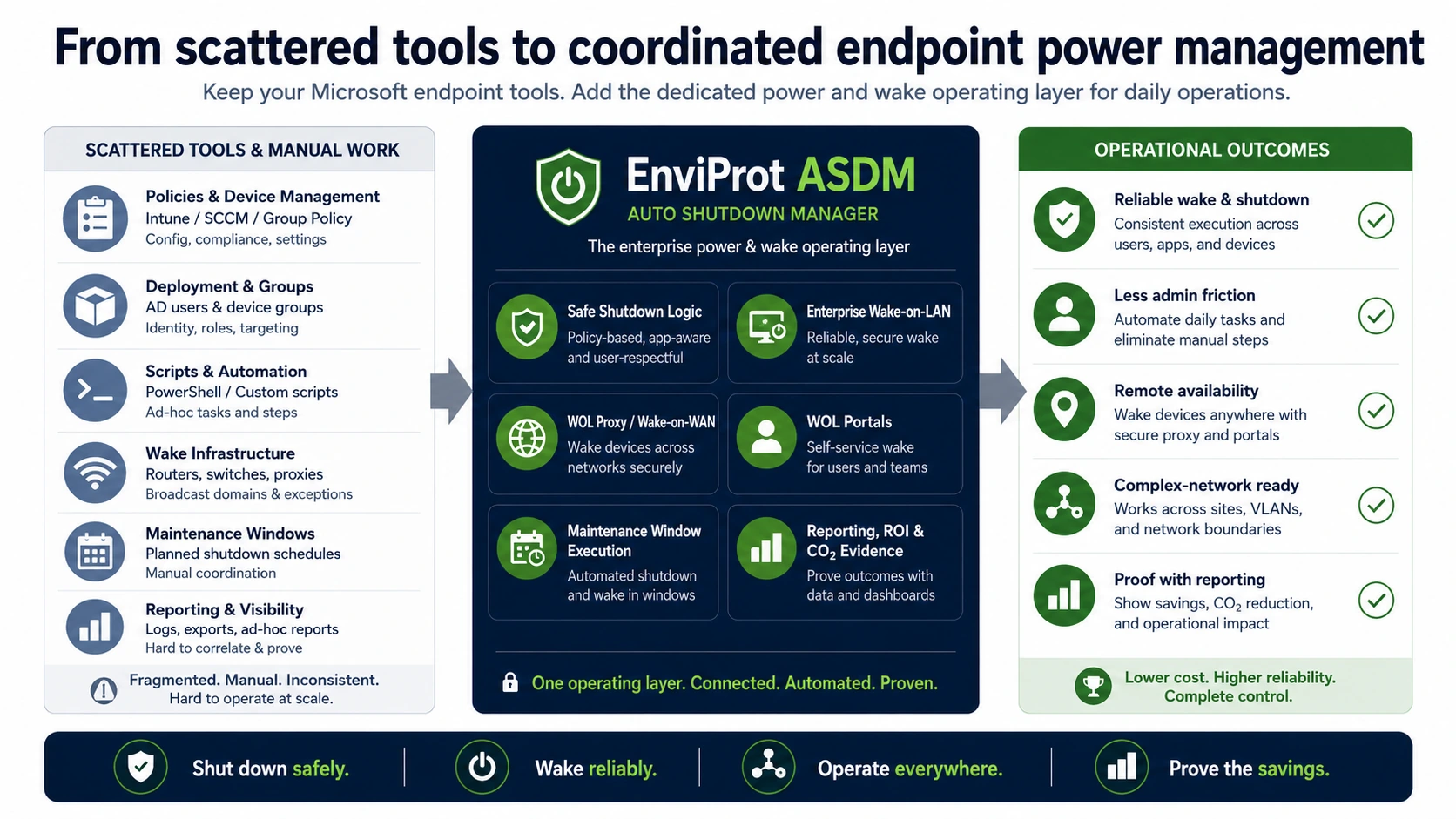
Operating model
Enterprises can keep their Microsoft endpoint tools while ASDM coordinates shutdown, wake, maintenance readiness, remote availability and savings proof.
Existing stack
Windows settings, GPO, SCCM/MCM, Intune and scripts remain useful for configuration, compliance, deployment and administration.
Operating gap
IT still has to decide when shutdown is safe, when wake-up is required, how remote sites are reached and how savings are proven.
ASDM
ASDM brings shutdown, wake, portals, maintenance windows and reporting into one ready-made enterprise power-management workflow.
ASDM answer
The value is not one magic button. It is the operational connection between safe shutdown, reliable wake-up, user protection, maintenance and proof.
ASDM helps avoid disruptive shutdowns by considering user activity, configured schedules and operational conditions before power policies take effect.
Explore idle shutdownCentral wake requests can be delivered across routed environments using the appropriate wake path for the network design.
Explore Enterprise Wake-on-LANFor remote segments and sites, ASDM supports managed wake delivery patterns instead of relying on ad-hoc router exceptions alone.
Explore WOL ProxyAuthorized users and helpdesk workflows can wake assigned office PCs without leaving machines powered on permanently.
Explore WOL PortalsASDM can help keep endpoints available for patching, scans and support work, then return them to power-saving policy afterwards.
Explore maintenance windowsEnterprise power management needs proof. ASDM reporting helps estimate, validate and communicate runtime, cost and CO₂ impact.
Calculate ROIASDM does not harden endpoints or replace security tools. It can support exposure reduction by helping avoid unnecessary endpoint runtime when devices are not needed.
See Microsoft complement positioningMicrosoft fit
Enterprise IT does not need another tool that pretends the rest of the stack does not exist. ASDM fits beside Microsoft endpoint management and closes the dedicated power-and-wake process around it.
Configuration Manager can support deployment and maintenance scenarios. ASDM adds the daily power-state workflow around shutdown reduction, wake availability and maintenance readiness.
Explore SCCM/MCM integrationIntune and GPO are useful for configuration and policy. ASDM adds runtime decisions, user protection, wake routing and savings proof for daily endpoint operations.
Compare native tools and ASDMEnterprise value
Reduce repeated troubleshooting around sleep states, wake paths, late users, maintenance availability and script exceptions.
Move from scattered policies and scripts to a repeatable operating model that can be piloted, documented and scaled.
Support cost, energy and CO₂ goals with a measurable enterprise tool instead of a long custom project.
Power management is not a security product. But unnecessary runtime can mean unnecessary exposure. ASDM can help reduce avoidable endpoint runtime while preserving wake-up and maintenance availability.
Rollout path
Endpoint power management depends on real users, real network paths and real maintenance routines. A pilot should prove savings and availability before broad rollout.
Select departments, device types and remote segments that reflect your actual operating model.
Check user protection, maintenance availability, Wake-on-LAN paths and exception handling before expanding scope.
Use reporting and ROI estimates to communicate results, then expand policies and wake workflows across more groups.
FAQ
No. ASDM complements Microsoft endpoint management. SCCM/MCM, Intune and GPO remain useful for configuration, deployment and policy. ASDM adds the dedicated endpoint power and wake workflow around those tools.
The goal is controlled, user-aware shutdown, not forced interruption. Policies should be configured and validated in your environment so active users, approved exceptions and maintenance tasks are respected.
ASDM supports enterprise wake scenarios including WOL Proxy and Wake-on-WAN patterns. Wake success still depends on endpoint hardware, firmware, power state and the available network path.
WOL Portals can let authorized users wake assigned office PCs when needed, while IT keeps the wake workflow controlled instead of leaving PCs running all the time.
Yes. ASDM can help align endpoint availability with patching, scans and administrative routines, then return devices to power-saving policy after the work is complete.
No. ASDM is not an endpoint security product and does not replace endpoint protection, patching or hardening. It can help reduce unnecessary endpoint runtime while preserving wake-up and maintenance availability.
Start with the 45-day Enterprise Trial, choose a representative pilot group, validate wake reliability and user protection, then use reporting and ROI estimates to decide how to scale.
They can support it, but only as a secondary operational benefit. Power management is not endpoint security. However, if a PC does not need to run overnight or over a weekend, reducing that unnecessary runtime can also reduce unnecessary exposure while patching, endpoint protection and hardening remain separate responsibilities.
Enterprise trial
Use the 45-day Enterprise Trial to validate safe shutdown, reliable wake, maintenance availability and reporting in your own environment.
Solutions · Public sector & education
Our Auto Shutdown Manager (ASDM) helps education and public-sector IT teams reduce avoidable PC runtime, keep classrooms and offices ready, wake devices for maintenance, and prove savings without building another script project.
Shut down safely. Wake reliably. Prove the savings.
The public-sector IT conflict
In schools, universities, municipalities and public agencies, endpoint power management fails when shutdown, wake-up, maintenance and reporting are handled as separate tasks.
Students and staff expect PCs to work at the start of the day. A pure “shut everything down” approach creates friction unless wake-up is managed reliably.
Leaving PCs on just in case wastes energy. Turning them off without a wake strategy can break maintenance windows and increase manual IT work.
VLANs, subnets, branch buildings and distributed campuses make basic Wake-on-LAN unreliable unless the wake path is designed for real networks.
Fast scan
ASDM connects the daily power workflow around existing endpoint-management tools: Shut down safely. Wake reliably. Prove the savings.
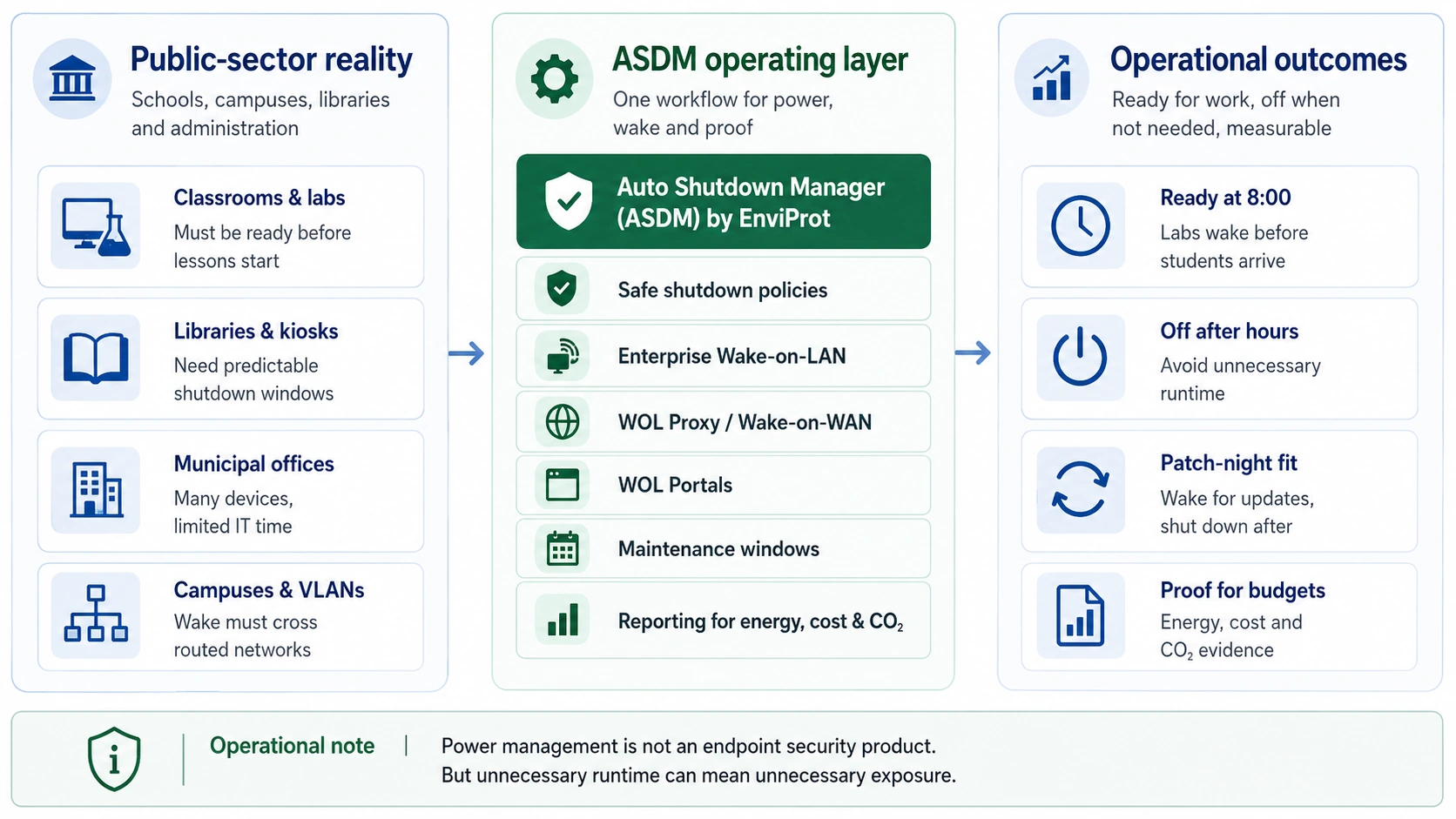
ASDM answer
Microsoft tools remain valuable. ASDM adds safe shutdown, reliable wake, maintenance availability, and reporting that many environments otherwise try to build with scripts, scheduled tasks, or manual procedures.
Shut down unused PCs with rules designed around real users, labs, libraries, shared devices and administrative workstations.
Wake PCs before classes, office hours, patch windows or support sessions so systems are ready when needed.
Support wake-up across routed networks, VLANs and distributed sites where basic broadcast-based Wake-on-LAN is not enough.
Give authorized users or support teams controlled ways to wake assigned PCs without opening broad admin access.
Keep devices available for updates and other maintenance work, then return them to the intended power state afterwards.
Provide evidence for IT leadership, budget discussions and sustainability reporting instead of relying on assumptions.
Microsoft fit
Public-sector IT teams often already have mature Microsoft tooling. ASDM should complement that stack with centralized power and wake control, not compete with it.
Use Configuration Manager for software deployment and updates. Use ASDM to help devices be awake for the operational window and powered down when the work is done.
Keep policy and configuration management where it belongs. Use ASDM for the recurring power workflow: safe shutdown, reliable wake, portals and savings reporting.
Where it fits
The value goes beyond turning PCs off: ASDM combines controlled endpoint availability with measurable energy, cost and CO₂ data.
Wake labs before lessons and shut down shared PCs after use, while keeping exceptions possible for exams, open days or after-hours work.
Coordinate labs, libraries, offices and distributed buildings across routed networks without relying on one-off local scripts.
Reduce avoidable runtime across large PC fleets while preserving supportability, maintenance access and operational oversight.
Proof points
These historical references show how ASDM has been used in schools and campus environments. Savings, licensing and rollout requirements vary, so validate the assumptions in your own environment.
The MISD case study describes a school-district environment with 8,500 PCs across 47 campuses, including coordination with Microsoft SCCM for updates and central power control.
Open school district case studyAn ENERGY STAR-published historical case study describes ASDM in the UC Berkeley LoCal power monitoring and conservation project. It provides useful background, although current savings depend on the deployment environment.
Open ENERGY STAR case referenceThe ASDM brochure describes a school-district classroom scenario where teacher workstations needed controlled logoff and shutdown behavior between classes.
Open ASDM brochureThe ASDM brochure describes a higher-education deployment focused on saving energy, conserving resources and reducing cost without disrupting daily work.
Open ASDM brochureProcurement and measurable results
We recommend starting in a representative environment, validating wake and shutdown behaviour, and then using the reports in budget and sustainability discussions.
Start with a mix of labs, offices and distributed sites. Validate shutdown rules, wake reliability and maintenance-window behavior before broad rollout.
Download 45-Day Enterprise TrialReview our documented education references, then validate the operational and savings assumptions in your own environment.
Open school district case studyUse measured runtime, energy, cost and CO₂ data to support budget discussions alongside the technical requirements.
Calculate ROISecurity context
ASDM is not an endpoint security product and does not replace patching, endpoint protection or hardening. But unnecessary runtime can mean unnecessary exposure. Public-sector PCs that do not need to run overnight or over weekends do not need to stay unnecessarily exposed either.
FAQ
No. ASDM complements those tools. SCCM/MECM, Intune and Group Policy remain responsible for configuration, policy and deployment. ASDM adds the dedicated workflow for safe shutdown, reliable wake, maintenance availability, WOL Portals and savings reporting.
Yes. Devices can be planned around maintenance windows and then returned to the intended power state after the work is complete, where hardware and network conditions allow.
ASDM can use WOL Proxy and Wake-on-WAN concepts for environments where basic local broadcast wake-up is not enough. The exact design should be validated against your network topology.
WOL Portals can provide controlled wake options for authorized users or support staff, depending on how the environment is configured.
The goal is controlled shutdown, not blind shutdown. Rules should be piloted with representative users, device types and schedules so labs, libraries and offices remain usable.
No. Power management is not endpoint security. But reducing unnecessary runtime can reduce unnecessary exposure. Patch management, endpoint protection and hardening remain separate responsibilities.
Start with a 45-day trial in a representative pilot group. Validate wake reliability, user impact, reporting, ROI assumptions and maintenance-window behavior before scaling.
Contact our team for the currently available licensing and procurement terms.
Start controlled
Run a focused trial, calculate the savings potential, and discuss licensing or rollout questions with Sales.