
 DE
DE  EN
EN Why ASDM · Vs. Native Tools
ASDM vs. SCCM, Intune and GPO for Endpoint Power Management
Windows, Group Policy, Microsoft Configuration Manager and Intune are essential endpoint-management tools. Auto Shutdown Manager does not replace them. It adds the dedicated power and wake layer for organizations that need safe shutdown, reliable Wake-on-LAN, remote user wake-up, maintenance-window availability, measurable savings and less avoidable endpoint runtime.
Fair comparison
Native tools are useful. They just do not cover the whole process.
Windows power settings, GPO, SCCM/MCM and Intune all have a place in endpoint management. They are strong for configuration, compliance, deployment and administration. The gap appears when endpoint power management becomes a daily operating process across users, sites, maintenance windows, remote access and reporting.
What native tools are good at
- Applying baseline policies and settings.
- Managing device configuration and compliance.
- Running required deployments, updates and task sequences.
- Supporting standard endpoint-management operations.
Where ASDM adds value
- Deciding when a PC may shut down safely.
- Waking PCs reliably for maintenance, support and remote work.
- Giving users controlled self-service wake-up paths.
- Estimating, piloting and proving energy, cost and CO₂ savings.
- Reducing avoidable runtime without losing planned availability.
Visual quick scan
From fragmented controls to a managed power & wake workflow.
GPO, Intune and SCCM/MECM remain useful for policy, configuration and deployment. The operational gap appears when user safety, running jobs, maintenance windows, Wake-on-LAN, reporting and daily support have to work together.
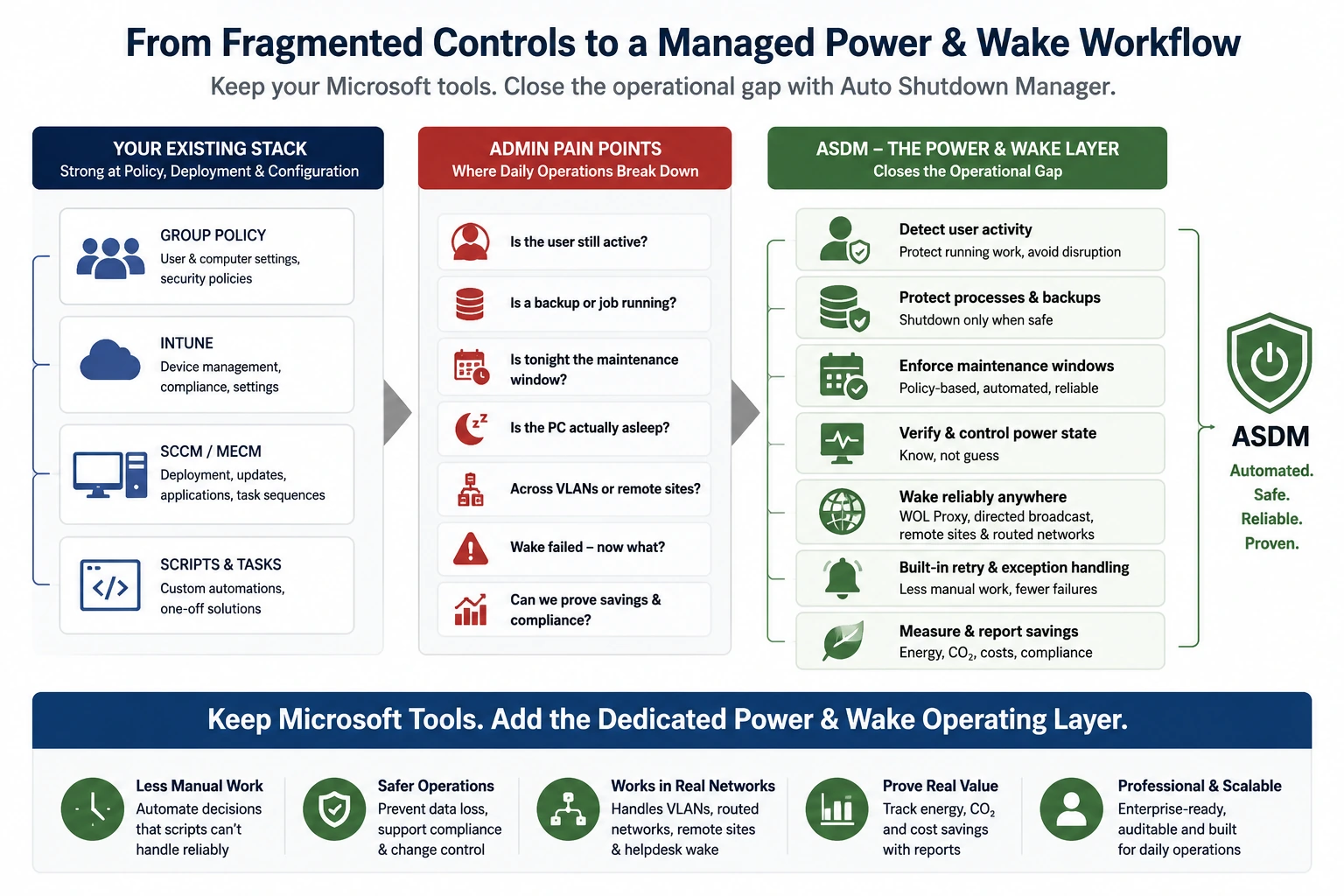
Operating gap
Where native controls stop and ASDM takes over.
The problem is not that Microsoft endpoint tools are weak. The problem is that power state, user safety, wake-up, routed networks and proof become one daily operating workflow.
Windows power settings / GPO
Policy exists — but runtime decisions still happen elsewhere
Baseline settings do not know whether work is still active, whether an exception is justified, or whether runtime savings are actually being achieved.
Auto Shutdown Manager adds safe idle detection, user-aware power workflows and central runtime, savings and CO₂ reporting.
SCCM / MECM / Microsoft Configuration Manager
Deployment wake is not the same as daily availability
Maintenance windows need endpoints awake at the right time, while shutdown, wake, support and remote access must not conflict.
ASDM connects shutdown reduction with scheduled wake, maintenance readiness, WOL Portals, remote availability and proof.
Microsoft Intune
Configuration delivery is not a local wake infrastructure
Cloud policy does not wake sleeping PCs across real network paths, remote sites and routed networks on its own.
ASDM provides a local and self-hosted wake layer with routed Wake-on-LAN workflows and assigned-PC wake-up paths.
Custom scripts and scheduled tasks
Scripts solve exceptions — then become the operating model
Scripts depend on the people who wrote them. Routing exceptions, retry behavior, handover and reporting stay fragile.
ASDM turns these exceptions into a supported product workflow with central policies, retries, reporting and less script sprawl.
Operational gap
Endpoint power management is a workflow, not just a setting.
Once power management has to support real users, distributed networks, patch windows, remote access and reporting, IT needs a controlled process from detection to proof.
Detect
Is the endpoint really idle, or is work still happening?
Protect
Avoid interrupting users, business hours, jobs and maintenance.
Shut down
Apply controlled shutdown, sleep, hibernate, restart or logoff policies.
Wake
Bring PCs back for updates, support, remote access or scheduled work.
Prove
Report runtime, savings, cost and CO₂ impact.
Requirement map
What changes when power management becomes operational?
The practical difference is ownership. Native tools provide important controls; Auto Shutdown Manager adds the daily operating workflow around shutdown, wake, exceptions and proof.
Baseline power policy
Native-tool fit: Strong fit for standard settings and policy distribution.
ASDM added layer: Turns policy into a managed runtime process with decisions, exceptions and reporting.
Safe idle shutdown
Native-tool fit: Basic timers or custom logic may cover simple cases.
ASDM added layer: Adds controlled idle detection, rules and user protection before shutdown.
Maintenance-window availability
Native-tool fit: Supported in some endpoint-management scenarios.
ASDM added layer: Connects reduced runtime with scheduled wake and maintenance readiness.
Wake-on-LAN across real networks
Native-tool fit: Depends heavily on network design and the deployment scenario.
ASDM added layer: Adds enterprise wake concepts for routed networks, sites and daily operations.
Remote users waking assigned PCs
Native-tool fit: Not the main focus of native policy tools.
ASDM added layer: Self-hosted WOL Portals can provide controlled user wake-up paths.
Energy, cost and CO₂ proof
Native-tool fit: Usually not the main focus of configuration tools or scripts.
ASDM added layer: Supports estimation, pilot validation and reporting for management decisions.
Avoidable runtime and exposure window
Native-tool fit: Depends on policy coverage, scripts and operational discipline.
ASDM added layer: Reduces unnecessary runtime while preserving wake-up and maintenance availability. ASDM does not replace endpoint security tools.
Where it matters
Four situations where the native-tool gap becomes visible
Patch and maintenance windows
Endpoint management tasks need PCs to be available at the right time. ASDM helps reduce unnecessary runtime while waking machines when planned work needs them.
Explore remote shutdown and wake-up →Remote access without 24/7 runtime
Remote access tools solve the session. They do not solve the availability problem before the session starts. WOL Portals help users wake assigned PCs on demand.
Explore WOL Portals →Savings proof for management
Power management projects need more than assumptions. ASDM supports estimation, trial validation and reporting for energy, cost and CO₂ impact.
Open ROI Calculator →Less unnecessary runtime
Power management is not a security product. But unnecessary runtime can mean unnecessary exposure for unattended office PCs that do not need to stay online.
Explore safe idle shutdown →Evaluation path
A practical way to evaluate ASDM next to your existing Microsoft tools
Start small. Validate the behavior in your own environment. Then decide whether the dedicated power and wake layer is worth scaling.
Estimate
Use the ROI Calculator to estimate potential energy, cost and CO₂ savings.
Pilot
Test with a controlled group, site, lab or department before rollout.
Validate
Check shutdown safety, Wake-on-LAN reliability, maintenance windows and user impact.
Prove
Use reporting and operational feedback to decide how far to scale.
FAQ
Common questions before comparing ASDM with native tools
Does ASDM replace SCCM, Intune or GPO?
No. ASDM is designed to complement existing endpoint-management tools. It adds a dedicated power and wake workflow for safe shutdown, reliable wake-up, user self-service wake and savings proof.
Can Configuration Manager already wake computers?
Yes, Configuration Manager supports Wake-on-LAN for supported deployment scenarios. ASDM focuses on the broader operational workflow: safe shutdown, scheduled availability, routed Wake-on-LAN concepts, WOL Portals and reporting.
Why not solve this with Group Policy?
Group Policy is useful for baseline settings. ASDM adds runtime logic, central operations, Wake-on-LAN infrastructure, reporting and user-facing wake workflows.
Why not script it?
Scripts can solve narrow tasks, but they often become difficult to maintain, audit and scale. ASDM provides a ready-made product with central policies, logs, reporting, portals and a trial path.
Does ASDM replace endpoint security tools?
No. ASDM is not an endpoint security product. It can support operational exposure reduction by helping avoid unnecessary runtime, while endpoint protection, patching and hardening remain separate responsibilities.
Can we test this without a large project?
Yes. Start with the ROI Calculator and the 45-day Enterprise Trial. Validate shutdown behavior, wake reliability, maintenance windows and reporting in your own environment.
Keep Microsoft endpoint management. Add the missing power and wake layer.
Evaluate Auto Shutdown Manager where native tools and scripts usually stop: safe shutdown, reliable wake, remote availability, less avoidable runtime and proof of savings.