
 DE
DE  EN
EN Solutions · Multi-Site & VLANs
Wake-on-LAN Across Sites, VLANs and Branch Offices
In real networks, energy savings only help if the right PCs can still be reached. Auto Shutdown Manager by EnviProt brings shutdown, wake, maintenance and remote availability into one managed process across VLANs, routed subnets and branch locations.
The enterprise Wake-on-LAN gap
Wake-on-LAN gets harder when PCs are spread across real enterprise networks
Wake-on-LAN may look simple inside one local subnet. Enterprise environments are different: endpoints sit behind VLANs, routers, firewalls, branch networks and remote-access paths. That is where wake reliability becomes an operations topic, not just a packet.
Wake packets meet network boundaries
A signal that works in one subnet may stop once VLANs, routers or firewall rules sit between ASDM and the target device.
Sites without local hands
IT still needs to wake machines in branch offices, labs or remote locations where nobody is standing next to the PC.
Network controls are part of the design
Routers and firewalls can block, limit or redirect the traffic that basic Wake-on-LAN tools rely on.
Availability is the real outcome
For IT, the value is not the packet itself. The value is predictable wake, shutdown, maintenance access and proof that the process works.
Operational model
Put wake capability where the endpoint can actually receive it
The practical question is simple: where does the wake signal need to be generated, and who controls it? ASDM provides central orchestration while WOL Proxies, directed broadcasts and portal-based wake paths handle the local network reality where conditions allow.
01 · Network map
Map the endpoint groups
Start by understanding where endpoints actually sit: which site, VLAN, subnet, building, branch or remote-access path they belong to.
02 · Wake reach
Place the wake path close enough
Use WOL Proxies, directed broadcasts or portal-based wake paths where they fit, so target networks can be reached without leaving every PC powered on.
03 · Operations
Operate and prove the process centrally
Bring wake, shutdown, maintenance windows, remote support and reporting into one controlled process instead of letting each site invent workarounds.
Important condition
Be precise about wake reliability.
No Wake-on-LAN product can bypass every BIOS, network adapter, sleep-state, switch, router or firewall condition. ASDM provides the management and wake infrastructure layer; your rollout should still validate the wake path before it becomes operationally important.
Architecture visual
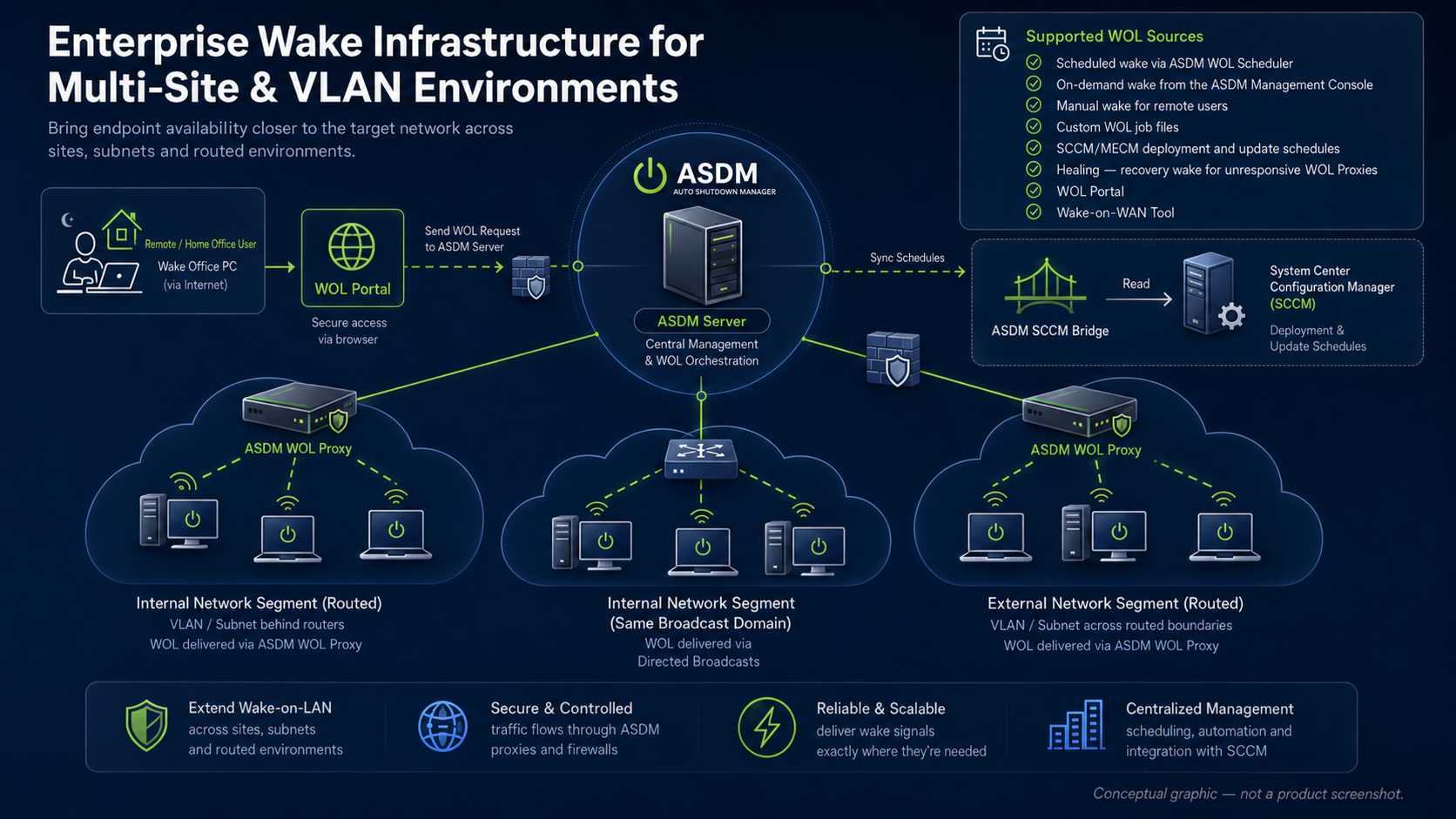
A modern wake architecture for multi-site and VLAN environments
A shared architecture view helps IT leaders and administrators discuss the same model: WOL Portal access, ASDM Server orchestration, WOL Proxies, routed segments, directed broadcasts and SCCM/MECM schedule integration.
Where standard tools usually stop
Multi-site wake and power control need more than a single wake button
Windows, SCCM/MECM, Intune, GPO, scripts and basic WOL tools can all help with parts of the job. ASDM complements them by connecting wake reachability, endpoint power actions, maintenance protection and central control.
Reach endpoints beyond one flat LAN
IT needs to reach devices across routed networks, branch sites and VLAN boundaries.
Broadcast behavior does not travel everywhere
Basic Wake-on-LAN depends on traffic behavior that may not cross routers, VLANs or firewalls unless the path is deliberately designed.
Place wake capability near the target network
ASDM supports enterprise wake scenarios and WOL Proxy approaches, so wake capability can be placed closer to the target network where conditions allow.
Support branch offices without local hands
Remote sites should not depend on someone walking over to a PC just to press the power button.
Manual fallback becomes the habit
When wake is unreliable, support teams fall back to phone calls, local staff or simply leaving machines powered on.
Central wake and power actions
ASDM helps IT wake, shut down, restart and return endpoints to policy centrally, reducing the need for local intervention.
Keep remote access possible
Energy savings should not mean every remote-access PC has to stay on 24/7.
Always-on becomes the workaround
If users or IT cannot reliably wake a remote PC, the practical workaround is often to leave it running.
Wake before access
ASDM can be combined with WOL Portals and enterprise wake scenarios so endpoints can sleep or power down and still be made available when needed.
Preserve maintenance windows
Devices still need to be awake for updates, scans and administrative work at planned times.
Shutdown and patching can conflict
A power plan may save energy but cause maintenance problems if wake and policy return are not part of the workflow.
Wake, maintain and return to policy
ASDM connects wake scheduling, maintenance windows and endpoint power policies so devices can be available for planned work and avoid unnecessary runtime afterwards.
Roll out safely across sites
Distributed environments deserve a controlled pilot before broad rollout.
One site’s result may not apply everywhere
Different switch, router, subnet, firmware and adapter settings can produce different wake behavior.
Validate, group and scale
ASDM supports a staged rollout by site, group or organizational unit so IT can validate network behavior before scaling.
Safe adoption path
Prove the wake path before you scale it
Wake reliability varies by environment. Start with a controlled network group, validate the full path and then expand by site, VLAN, department or organizational unit.
Start with a known site
Choose a limited group of endpoints where network boundaries, firewall rules and maintenance expectations are already understood.
Validate the full wake path
Confirm firmware, adapter settings, sleep states, WOL Proxy placement, directed broadcasts and routed reachability before relying on the result.
Scale only after proof
Expand only when wake behavior, user impact, maintenance availability and policy return are predictable in your own environment.
Complement, not replacement
ASDM adds the dedicated wake and runtime layer around the tools you already run
Keep your network design, SCCM/MECM, Intune, GPO and endpoint security responsibilities. Auto Shutdown Manager by EnviProt adds the operational layer that makes shutdown, wake, remote access and maintenance availability manageable across distributed environments.
Respect routed network design
Routing, VLANs, firewall policy and endpoint configuration remain the foundation. ASDM works with those realities instead of pretending they do not exist.
Complement management tools
SCCM/MECM, Intune, GPO and scripts can stay part of endpoint operations. ASDM adds the dedicated wake, shutdown and runtime-control layer around them.
Enable controlled remote wake
WOL Portals and wake infrastructure can help make distributed endpoints reachable where policy, hardware and network conditions allow.
View WOL PortalsFAQ
Multi-site Wake-on-LAN and routed networks
Can Wake-on-LAN work across VLANs and routed networks?
Yes, but it depends on network design, endpoint hardware, firmware, adapter settings and security controls. ASDM provides enterprise wake and power-management capabilities; the actual wake path should still be validated before broad rollout.
Why are WOL Proxies useful?
A WOL Proxy or local wake component can bring wake capability closer to the target subnet or branch site. That reduces dependence on direct broadcast behavior from one central location.
Does this replace SCCM, MECM, Intune or GPO?
No. ASDM complements these tools. They remain important for endpoint management, policy, deployment and compliance. ASDM adds the dedicated wake, shutdown, runtime and reporting layer around them.
Can remote users wake their assigned PCs?
Usually through WOL Portals or related remote-wake scenarios, if the organization allows and validates that workflow. Multi-site wake infrastructure can support it, but portal permissions and network behavior need careful planning.
Should we roll this out everywhere at once?
No. Start with a site or subnet where the network path is understood, validate wake behavior, and then expand by group, site or organizational unit.
Shut down safely. Wake reliably. Prove the savings.
Turn distributed endpoint power control into a repeatable process
Start with a controlled pilot across your real VLANs, sites and branches. Then connect wake reliability with safe shutdown, maintenance windows and remote access workflows.