
 DE
DE  EN
EN Why Auto Shutdown Manager · Endpoint power management workflow
How Auto Shutdown Manager Works
Auto Shutdown Manager by EnviProt is not just a shutdown command. It is a managed endpoint power workflow: detect real idle, protect users and maintenance tasks, shut down safely, wake endpoints reliably and prove the savings.
The operating model
From idle endpoint to proven savings
ASDM works best when it is understood as a complete operating process. Windows power policies, GPO, SCCM/MECM, Intune and scripts can solve parts of the job. ASDM focuses on the full power-management workflow: decide when a PC is really safe to power down, keep availability for users and maintenance, then show the result in reporting.
Detect real idle
Idle can be defined with more than keyboard or mouse inactivity: workload, applications, services, network traffic, sessions and other signals can be part of the decision.
Protect users and tasks
Warnings, time rules, maintenance mode and pre-shutdown actions help prevent automation from interrupting active work, presentations, scans, backups or IT operations.
Apply central policy
Administrators can manage settings, groups, schedules and remote actions centrally instead of maintaining disconnected scripts or desk-by-desk settings.
Shut down safely
Depending on policy and environment, endpoints can be shut down, restarted, put into standby or hibernated when they are no longer needed.
Wake reliably
Availability is restored through timer wake-up, Wake-on-LAN, WOL Scheduler, WOL Proxy and Wake-on-WAN scenarios where hardware and network conditions allow.
Prove the savings
Reports and savings views help turn power management into a measurable business case instead of a hidden background task.
Product proof
A real workflow, visible in the product
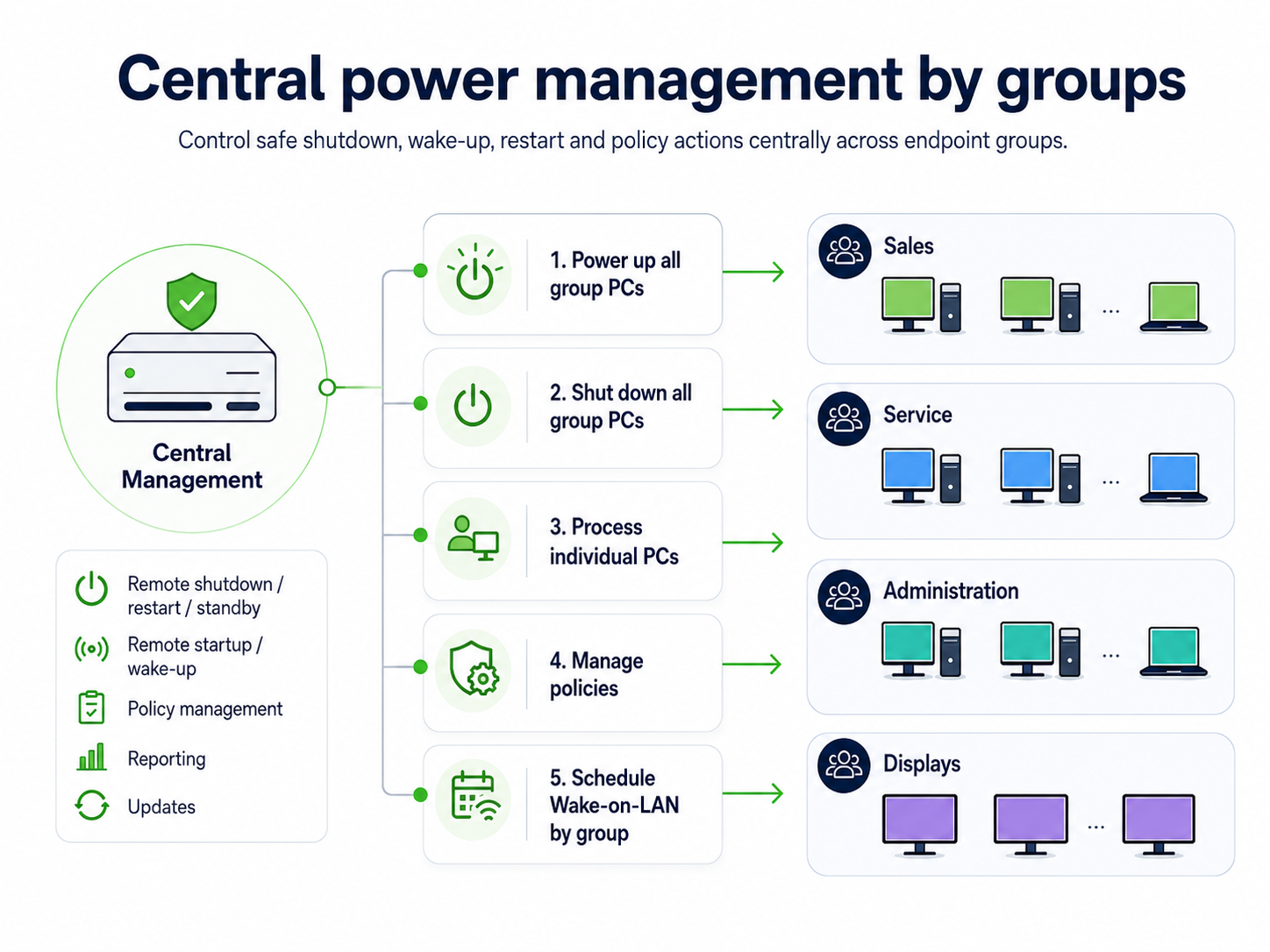
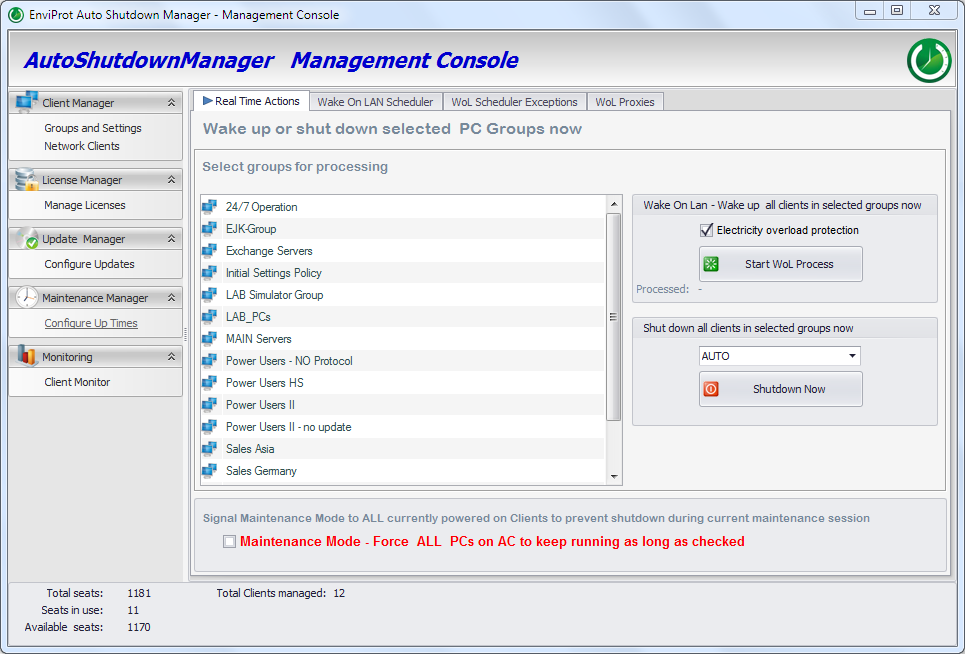
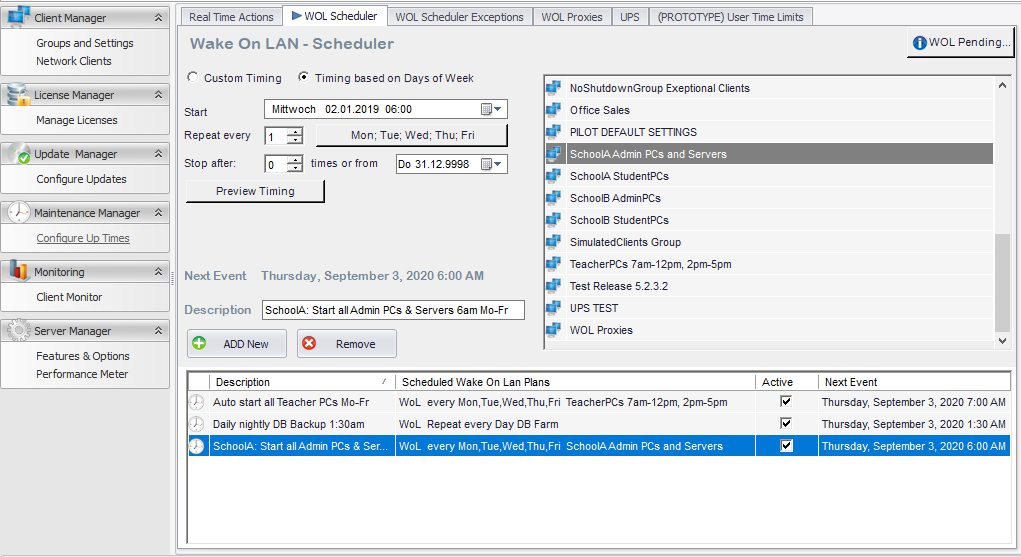
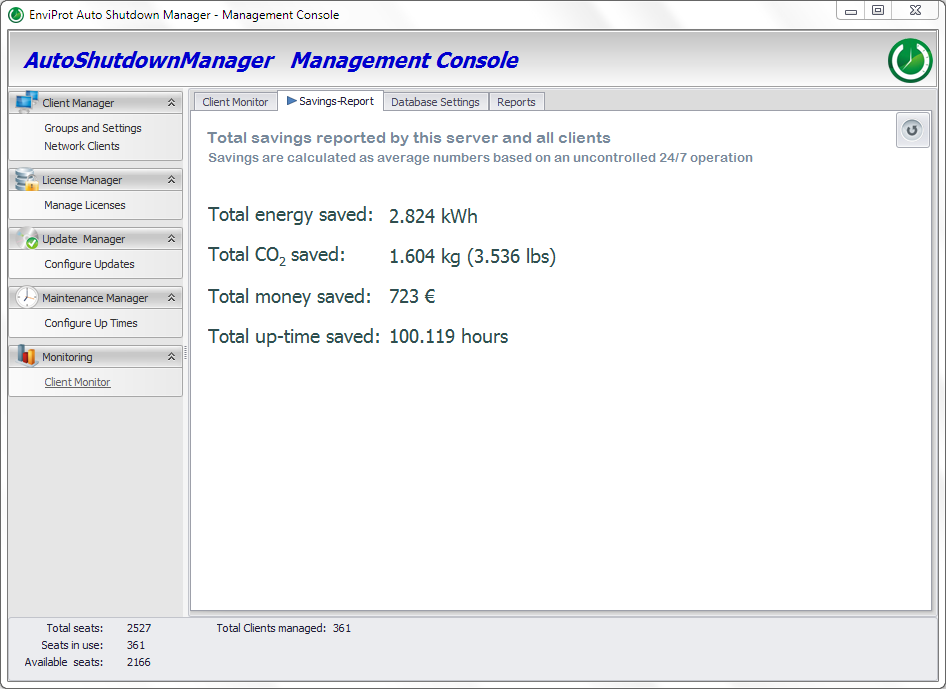
The workflow is not just a diagram. ASDM exposes central groups, real-time actions, wake scheduling and savings reporting as operational tools for IT.
Step 1 · Decide safely
ASDM checks whether a PC is really idle
The first risk in endpoint power management is false shutdown. ASDM lets administrators model idle in a way that fits the environment, not only a generic timeout.
User activity
Mouse and keyboard activity, active sessions and visible warning/cancel paths help distinguish idle machines from active users.
System workload
CPU, hard-disk utilization, scheduled tasks and sound activity can be considered before a shutdown decision is made.
Applications and services
Selected applications, processes, services and drivers can prevent or prepare shutdown where business workflows require it.
Network context
Network traffic, terminal sessions, printer queues and monitored TCP/IP devices can be part of the idle decision.
Step 2 · Avoid disruption
Controlled shutdown means protecting users, tasks and maintenance
Power automation should not become forced interruption. ASDM supports the controls IT needs to avoid shutting down the wrong PC at the wrong time.
Warnings and cancellation
Users can be warned before shutdown, and organizations can define when cancellation should be allowed.
Time rules and core hours
Policies can change by time, day, business hours, night, weekend or maintenance window.
Pre-shutdown actions
Applications or batch files can run before shutdown, documents can be saved and services or drivers can be handled as part of the process.
Maintenance Mode
Maintenance can keep endpoints available while work is still running, instead of fighting a local idle rule.
Groups and exceptions
Different rooms, departments, OUs, user groups or device groups can use different policies instead of one global timeout.
Operational confidence
The goal is not aggressive shutdown. The goal is safe shutdown that IT, users and management can trust.
Step 3 · Restore availability
Reliable wake-up is the other half of power savings
Organizations often leave PCs running because wake-up is unreliable. ASDM treats wake-up as part of the same process: scheduled wake, WOL routing, WOL Proxy scenarios and user-facing WOL Portals where they fit the environment.
Timer and scheduled wake
Endpoints or groups can be woken for known schedules, support windows or planned maintenance tasks.
Wake-on-LAN infrastructure
ASDM supports Wake-on-LAN approaches for local networks and routed environments, including WOL Proxy scenarios where required.
Remote availability
Wake-on-WAN concepts and WOL Portals can help remote users or helpdesk teams wake assigned PCs without keeping everything on 24/7.
Important: Wake behavior depends on hardware, firmware, operating-system power state and network configuration. ASDM provides the workflow and tooling; wake behavior should be validated in your own environment.
Step 4 · Scale through central management
From local settings to managed endpoint policy
ASDM is designed to reduce one-off scripts and manual configuration. Central Management lets IT work with clients, groups, settings, real-time actions, energy profiles and asset information from one operational console.
Settings and groups
Assign power policies to groups instead of maintaining separate local configurations.
Remote actions
Wake, restart, shutdown, hibernate, standby or log off selected clients or groups when the operation requires it.
Client overview
Monitor client status, events and operational conditions to understand what happens across the environment.
Microsoft endpoint management fit
ASDM complements Windows, GPO, SCCM/MECM and Intune
Windows, Group Policy, SCCM/MECM and Intune are important endpoint-management tools. ASDM is not positioned as a replacement. It adds a dedicated power, wake, availability and reporting workflow around the parts those tools do not fully operationalize.
What Microsoft tools already do well
- Baseline policies and endpoint configuration.
- Software deployment, inventory and update workflows.
- Device and compliance management.
Where ASDM adds a dedicated workflow
- Multi-signal idle detection and safe shutdown decisions.
- Wake infrastructure, WOL Scheduler, WOL Proxy and Wake-on-WAN scenarios.
- Maintenance-window availability and savings reporting.
Step 5 · Prove the result
Power management only matters when savings can be validated
The business case depends on showing avoidable runtime, estimated savings and operational status. ASDM reporting helps turn endpoint power management into evidence that IT leaders, procurement and management can evaluate.
Central savings report
Use reported client and server data to support the energy and cost-saving business case.
Operational events
Events and statistics help IT understand shutdown, wake and client behavior instead of guessing.
ROI validation
Estimate potential savings, validate the result in your environment and use the ROI Calculator as part of the evaluation path.
Practical rollout
Start small. Prove the workflow. Then scale.
ASDM does not need to start as a large project. A practical evaluation can begin with one group, room, site or use case and then expand after idle rules, wake behavior and reports are validated.
Select a pilot group
Choose a department, lab, classroom, office area or site with measurable runtime and clear availability needs.
Model idle and exceptions
Define signals, business hours, protected tasks, user warnings and maintenance windows.
Validate wake-up
Test WOL behavior, scheduling, proxy scenarios and remote-access needs where they apply.
Measure and expand
Use reports and the ROI Calculator to decide how to scale the workflow across groups and sites.
FAQ
Common questions about how ASDM works
Does Auto Shutdown Manager replace GPO, SCCM/MECM or Intune?
No. ASDM complements Microsoft endpoint management. Windows policies, GPO, SCCM/MECM and Intune remain important for endpoint configuration, deployment and management. ASDM adds the dedicated shutdown, wake, availability and savings-reporting workflow.
How does ASDM know whether a PC is really idle?
ASDM can consider multiple signals such as user activity, CPU and disk load, selected applications, processes, services, network traffic, sessions, scheduled tasks and other environment-specific conditions.
Can users stop a shutdown?
Depending on policy, users can be warned before shutdown and may be allowed to cancel. Administrators can also use time rules, exceptions and maintenance controls to prevent the wrong shutdown at the wrong time.
Can ASDM wake PCs across VLANs or remote sites?
ASDM supports enterprise Wake-on-LAN approaches such as scheduled wake-up, WOL Proxy scenarios and Wake-on-WAN concepts. Actual wake behavior depends on hardware, firmware, power state and network configuration, so it should be validated in your environment.
How are savings proven?
ASDM provides reporting and savings views that help estimate and validate the business case. For planning, use the ROI Calculator and then compare the estimate with operational reporting from your environment.
Evaluate the complete workflow
Shut down safely. Wake reliably. Prove the savings.
Use Auto Shutdown Manager to test the full endpoint power-management workflow: safe shutdown, reliable wake, maintenance availability, WOL Portals, central management and reporting.