
 DE
DE  EN
EN Platform · WOL Proxy & Wake-on-WAN
WOL Proxy & Wake-on-WAN for Enterprise Networks
Wake-on-LAN becomes an enterprise problem as soon as endpoints live behind routers, VLANs, branch offices and security policies. Auto Shutdown Manager by EnviProt can use WOL Proxies to wake PCs inside remote network segments without turning every router into a directed-broadcast exception.
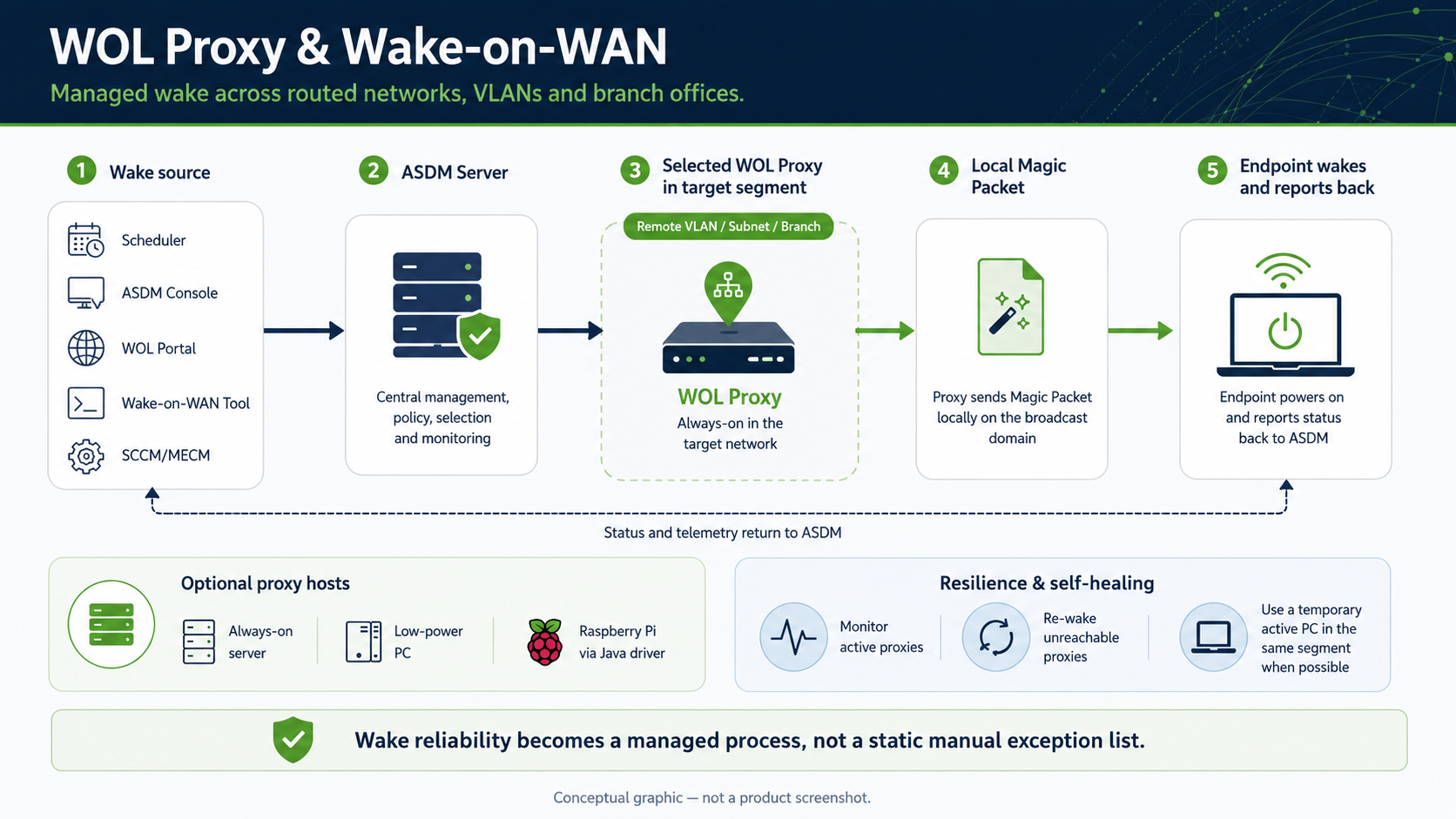
Conceptual overview
Wake reliability becomes a managed process, not a static exception list.
This is the complete idea in one view: wake requests can come from schedules, admins, portals or management tools; ASDM selects the right WOL Proxy in the target network; the proxy sends the Magic Packet locally; the endpoint wakes and reports back. Proxy hosts can be servers, low-power PCs or Raspberry Pi-class devices, while monitoring and temporary proxy handling improve resilience.
Why basic Wake-on-LAN stops at network boundaries
A Magic Packet must reach the right local network segment
Wake-on-LAN is simple inside one subnet. It becomes harder when the target PC is in another VLAN, behind a router, in a branch office or in a network where directed broadcasts are restricted by policy. That is where WOL Proxies are useful: they move the final wake action into the target segment.
Routed networks
Wake traffic that works locally may not cross routers or VLAN boundaries without a planned WOL approach.
Broadcast restrictions
Directed broadcasts may be unavailable, blocked or unwanted in many enterprise environments.
Remote sites
Branch offices and remote segments need local wake capability without requiring an administrator on site.
Ongoing maintenance
Networks change. Proxy candidates retire, move groups or become unavailable. Manual proxy lists age quickly.
How the proxy model works
Central request, local Magic Packet
The ASDM Server does not need to broadcast directly into every remote segment. It can ask a selected WOL Proxy in the target network to create the Magic Packet locally. The target PC wakes in its own segment and reports back to the ASDM Server when it comes online.
ASDM Server
Sends the wake request to the selected proxy for the destination segment.
WOL Proxy
Runs inside the target segment and creates the local Magic Packet.
Local broadcast
The packet reaches the sleeping PC on the local network where Wake-on-LAN can work.
Endpoint wakes
The PC starts and changes status back to available in ASDM.
Automatic WOL Proxy generation
From manual proxy lists to an optimized proxy topology
In large environments, manually choosing and maintaining WOL Proxies can become its own administration task. The WOL Proxy Auto Generator is designed to analyse the network, propose suitable proxy clients, reduce redundant proxy coverage and keep the topology useful as networks and devices change.
Analyse the network
ASDM can identify suitable proxy candidates based on network structure and endpoint availability, instead of forcing admins to build every entry by hand.
Respect admin rules
Administrators can exclude notebooks, unwanted segments or groups, prefer selected groups and keep manually selected proxies at the highest priority.
Minimize proxy count
The generator can reduce redundant subnet coverage and prefer clients that can serve multiple segments where this fits the network design.
Preview before rollout
A generated proxy list can be exported as an Excel-compatible CSV preview before changes are applied.
Assign policy groups
Selected proxy clients can be moved into a suitable WOL Proxy policy group so idle timers and time rules do not shut them down accidentally.
Maintain over time
Generation and optimization can be run daily, on a scheduler or manually, helping replace inactive, retired or defective proxy candidates.
Resilient wake infrastructure
Keep WOL Proxies available — and recover when one is down
A proxy that is unreachable cannot wake the segment it protects. ASDM can monitor active WOL Proxies, try to wake them again and, where possible, temporarily use another active PC in the same target segment to preserve wake capability while the intended proxy is unavailable.
Monitor active proxies
ASDM can watch configured WOL Proxies and detect when one becomes unreachable.
Try to wake the proxy
The server can attempt to reactivate the intended proxy so the designed topology comes back.
Use a temporary proxy
If another active PC exists in the same segment, ASDM can use it temporarily to trigger the local wake process.
Repair the topology
Scheduled generation and maintenance can replace inactive or unsuitable proxies as the network changes.
Important wording
Self-healing improves resilience. It is not a magic guarantee.
Wake reliability still depends on endpoint hardware, firmware, network policy and local segment conditions. The value of ASDM is that the wake topology can be monitored, repaired and operated centrally instead of being a static list of manual exceptions.
Low-power proxy options
A WOL Proxy does not always need to be a full server
Ideally, a WOL Proxy can be a server that already runs 24/7. Where that is not practical, low-power devices such as Raspberry Pi or other small PCs can be used with the EnviProt Java WOL Proxy driver. These devices can be a practical fit for branch offices, remote VLANs or small segments where a full server would be excessive.
Low runtime footprint
Use an already-on server where available, or a low-power proxy device where that is the better operational choice.
Branch office fit
Small sites often need local wake capability without adding a full infrastructure server.
Optional, not mandatory
Raspberry Pi support is an option for suitable environments. It is not required for every WOL Proxy design.
Special topic: VLANs
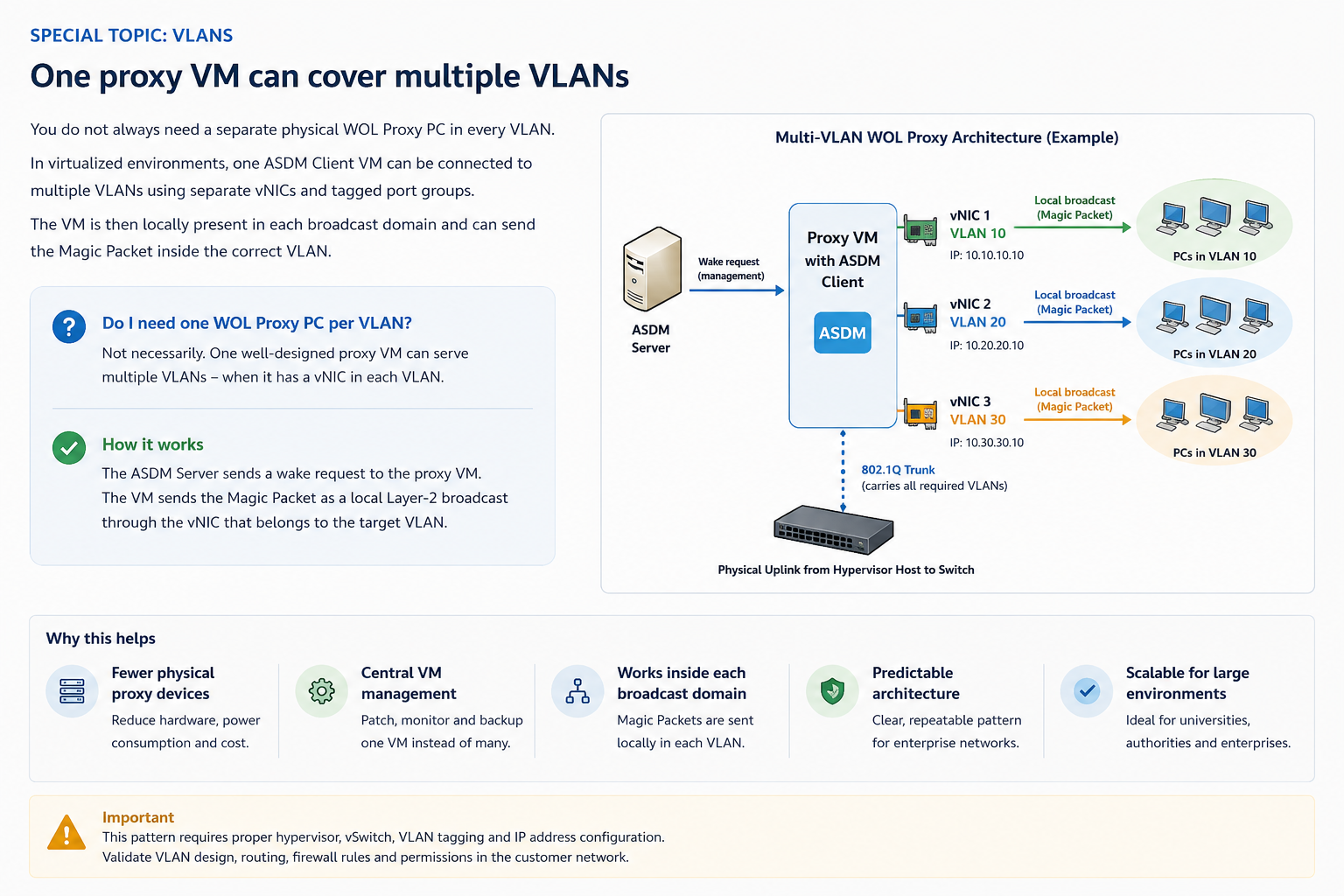
One proxy VM can cover multiple VLANs when it is locally present in each one.
In large environments, administrators often ask whether every VLAN needs its own physical WOL Proxy PC. Not necessarily. In a virtualized network, one VM running the normal ASDM Client can serve multiple VLANs when the VM has a separate virtual NIC in each target VLAN and each vNIC has a valid IP address in that subnet.
The ASDM Server sends the wake request to the proxy VM. The proxy VM then sends the Magic Packet as a local Layer-2 broadcast through the vNIC that belongs to the target VLAN. Because the broadcast is created inside the correct broadcast domain, there is no routed broadcast between the server and the sleeping endpoint.
Fewer physical proxy devices
Instead of placing a separate always-on proxy PC in every VLAN, a well-designed proxy VM can be attached to several VLANs.
Local broadcast per VLAN
Each vNIC makes the proxy locally present in that broadcast domain, so the Magic Packet is sent inside the correct target VLAN.
Useful for large networks
This pattern can simplify WOL Proxy planning for enterprises, universities, public-sector networks and large segmented environments.
Architecture guardrail
This is a network design pattern, not an automatic promise.
The VM must really be connected to the required VLANs with the correct vSwitch, tagged port groups, 802.1Q trunking, IP addressing, routing, firewall rules and permissions. Validate the VLAN design in the customer network before relying on it for production wake operations.
Why this matters
The difference is not just reachability. It is maintainable reachability.
Basic wake tooling often fails because the network changes faster than the manually maintained wake configuration. ASDM turns WOL Proxy handling into a managed topology with monitoring, candidate selection and policy integration.
Product proof
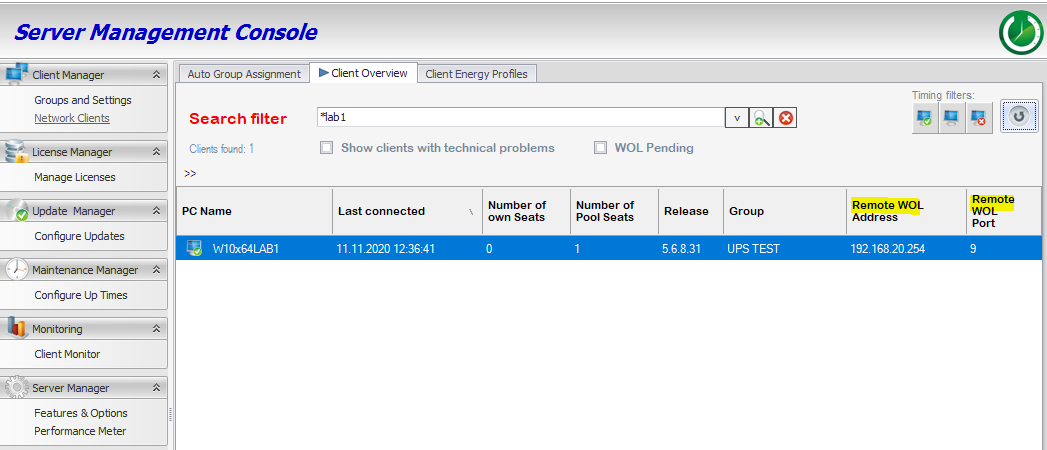
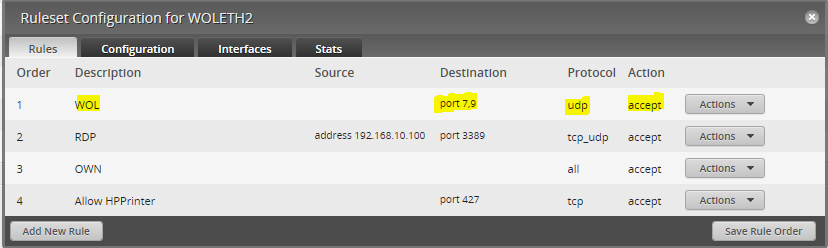
WOL Proxy handling is visible in the ASDM product workflow
The product screenshots below show real ASDM WOL Proxy configuration areas. The conceptual overview above explains the operating model; these screenshots provide product-level proof that WOL Proxy handling is part of the ASDM workflow.

FAQ
Questions IT teams usually ask first
When do we need a WOL Proxy?
You need a WOL Proxy when the target PC is in a network segment where simple local Wake-on-LAN traffic cannot reach it and directed broadcasts are not available, not allowed or not desirable.
Is Wake-on-WAN the same as sending a Magic Packet over the internet?
No. In an enterprise ASDM context, the important part is controlled wake across remote or routed network locations. A proxy in the target segment can create the local Magic Packet where the endpoint can actually receive it.
Do we need Raspberry Pi devices everywhere?
No. An always-on server can be the best WOL Proxy if it already exists in the segment. Raspberry Pi or similar low-power devices are useful options where a full server is unnecessary.
Does self-healing guarantee every wake-up?
No. Hardware, firmware, network and policy conditions still matter. ASDM can improve resilience by monitoring proxies, attempting wake-up and using temporary proxy options where possible, but every environment should be validated.
Do we need one physical WOL Proxy PC per VLAN?
Not always. In virtualized environments, one ASDM Client VM can cover multiple VLANs when it has a separate vNIC and valid local IP configuration for each target VLAN. The VM then sends the Magic Packet locally through the matching VLAN interface. This requires proper hypervisor, vSwitch, trunking, routing and firewall design and must be validated in the customer network.
Does ASDM replace SCCM, Intune or GPO?
No. ASDM complements endpoint management tools by handling the power and wake process around maintenance, remote availability and endpoint runtime control.
WAKE RELIABLY ACROSS REAL NETWORKS
Turn Wake-on-LAN from a router exception into a managed enterprise process.
Start with the networks where wake-up is unreliable today: routed VLANs, branch offices, remote sites or places where directed broadcasts are not acceptable. ASDM gives IT a controlled way to design, monitor and maintain WOL Proxy capability.